
How to Read a Live Streaming Camera Spec Before Buying
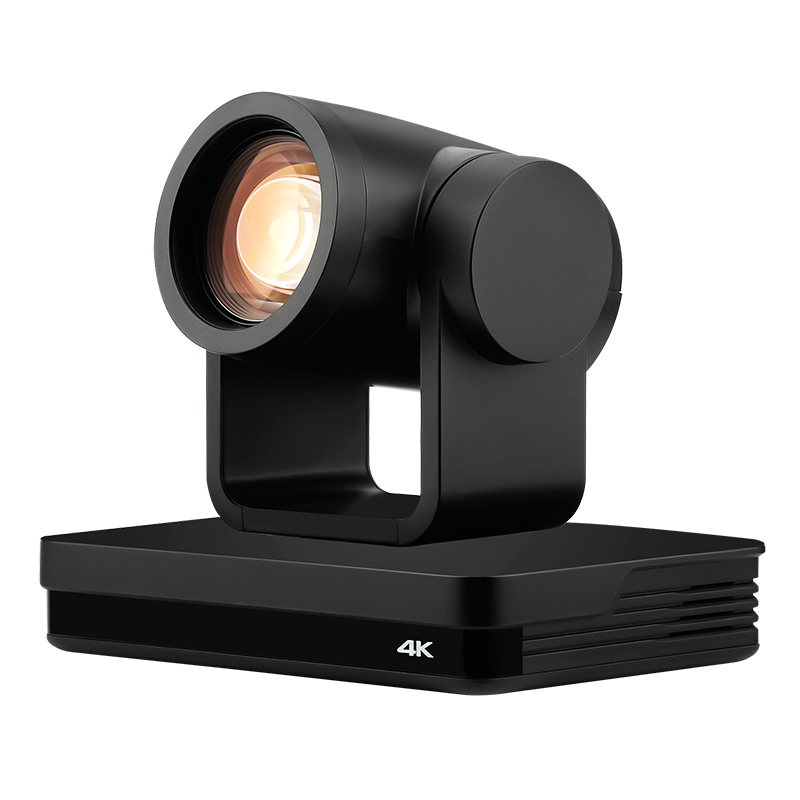
Live streaming has moved from an experimental production method to a standard distribution channel in education, corporate meetings, medical training and events. For procurement teams unfamiliar with video hardware, the term “live streaming camera” is still broad. It can describe a pan-tilt-zoom (PTZ) camera, a video conference camera, a classroom camera, a medical teaching camera or an event streaming camera. The relevant question is not only what the camera records, but how its video signal reaches an encoder, switcher, meeting platform, or streaming server.
Why “live streaming camera” is a category decision
A first-time buyer may search for “best live streaming camera” or “live streaming camera for church streaming.” Those searches expose real needs, but the product answer is still a category decision. “Live streaming” describes a workflow, not a single device type.
Consider a university lecture capture system. An education camera with HDMI output and network streaming capability can feed a classroom recorder and a lecture streaming platform at the same time. If the same camera is deployed in a small meeting room, a USB UVC interface may be more useful for direct connection to a laptop. A camera that is perfect for one setting may not have the right signal path for another.
For a structured product review, buyers should start with four practical questions:
- Where will the camera be installed, and is it an indoor environment with predictable temperature and humidity?
- Which receiving equipment will the camera feed: a screen, a software meeting app, a hardware encoder, a video switcher, or a streaming server?
- How will the operator control pan, tilt, and zoom: from a remote control, serial controller, IP software, or automatic tracking?
- Does the project need simultaneous outputs, such as USB to a computer plus HDMI to a local display?
These questions matter because manufacturers use product names to indicate application positioning. The same supply chain may produce a PTZ broadcasting camera, a video conference camera, an education teaching camera, a medical training camera, and an e-commerce streaming camera under one live streaming camera umbrella.
Product labels commonly used in the market
- PTZ camera: A camera with motorized pan-tilt-zoom mechanics, used when a camera must be repositioned or preset to multiple angles.
- Video conference camera: A camera designed for meeting rooms and collaboration spaces, often with USB plug-and-play or dual outputs.
- Education / classroom camera: A camera built for lecture capture, course recording, and distance learning.
- Medical training camera: A camera used to show procedures for teaching and training. It is not automatically a surgical camera; surgical OR integration has separate requirements.
- Event / broadcasting camera: A camera used in live event production, church streaming, or broadcast-style multi-camera workflows.
- E-commerce streaming camera: A camera positioned for product livestreaming and short-video oriented workflows, sometimes with a vertical or horizontal screen format switch.
For awareness-stage buyers, these labels are helpful but not final. The deciding factor is the specification sheet, especially output interfaces and supported streaming protocols.
Market signals behind live streaming camera demand
Market data should be used with restraint because category definitions differ between research firms. One monitoring reference projected the global live streaming camera market at USD 3.35 billion in 2025 and expected it to reach USD 7.79 billion by 2035, implying a compound annual growth rate of 8.8%. Another estimate places PTZ cameras at 38.5% of global conference camera revenue in 2025. In the adjacent video conferencing sector, hardware accounted for 46% of total video conferencing market revenue in 2024.
These figures tell a directional story: cameras remain a major part of live video investment, and the PTZ form factor is widely accepted in meeting and streaming environments. At the same time, buyers should compare analyst reports with caution. CAGR estimates for this category vary meaningfully, from roughly 7.8% to 15.9%, depending on whether PTZ cameras, conference cameras, and live streaming cameras are treated as one market or as separate segments.
For an individual purchase decision, market growth is less important than signal path compatibility. A growing market also creates a noisy supply chain, which is why supplier documentation matters.
What a mature manufacturer profile reveals
Category terminology becomes clearer when you examine a supplier that publishes detailed company and product descriptions. TCHD Digital Video Technology Development (Beijing) Ltd., commonly known as TCHD Video, is one example of a manufacturer that has moved from product branding into structured product definitions.
TCHD Video was established in 2005 and specializes in standardized video software and hardware products and application systems. The company has approximately 50 staff, operates a 10,000 square meter manufacturing facility, and maintains an R&D team of 10 engineers. Its annual production capacity is about 4,000 units. Export business accounts for 20% of total sales, with major markets in the EU, USA, and Asia. Its product range includes live streaming cameras, video capture cards, video converters, video encoders, and video switchers.
That product mix is relevant to procurement. A camera for live streaming does not work alone. It is often paired with a capture card, converter, encoder, switcher, or streaming server. A supplier with experience across those product categories is more likely to build cameras that behave predictably in a complete video chain.
Reading one manufacturer’s product matrix
TCHD Video groups its live streaming cameras by application category rather than by a single “camera” label. Three examples show how the matrix looks:
| Model | Positioning | Typical settings |
|---|---|---|
| TC-980S | PTZ camera intended for broadcasting; also described as an event streaming camera, education training camera, medical teaching camera, and video conference camera | Event production, education recording, medical teaching, video conference |
| TC420 | PTZ camera / video conference camera; categorized for live streaming, education teaching, e-commerce streaming, medical training, and event streaming | Conference rooms, classrooms, e-commerce studios, training rooms |
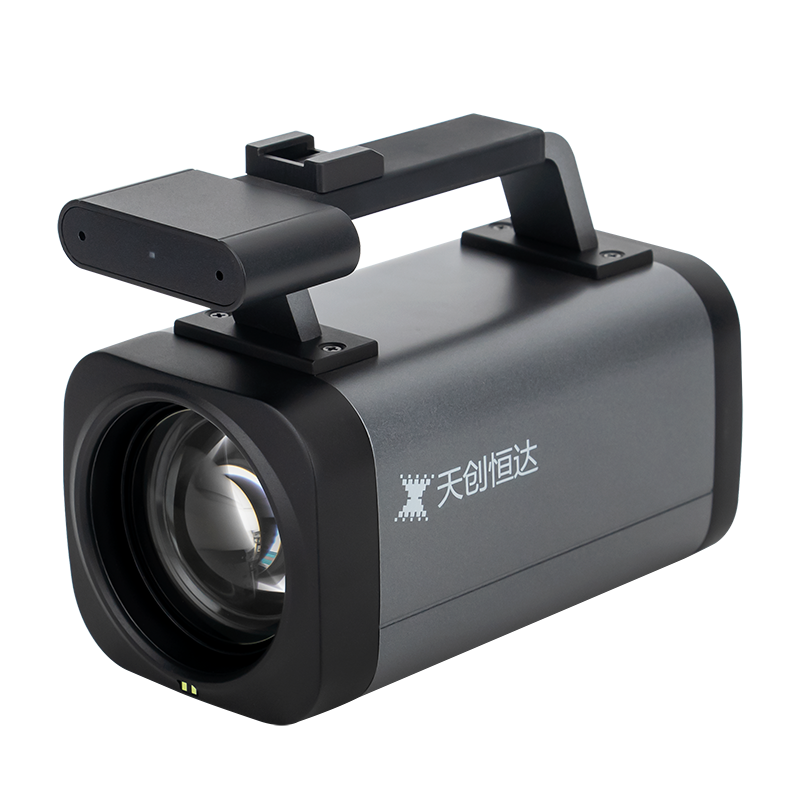
| TCHD-T3 | Education teaching camera / e-commerce streaming camera / medical training camera | Lecture capture, product livestreaming, medical teaching spaces |
This type of matrix helps a buyer avoid treating every camera as a generic webcam. The same manufacturer may offer different output combinations and different control protocols for different user environments.
Technical layers behind a live streaming camera
Professional live streaming cameras are often compared through resolution, but resolution alone is not enough. A more useful method is to examine six technical layers: sensor and lens, PTZ mechanics, video output interfaces, compression and protocols, control, and power.
Sensor and lens
A common sensor size in this product class is the 1/2.8-inch CMOS sensor. In the TCHD Video family, the TC-980S, TC420, and TCHD-T3 all use 1/2.8-inch sensors. The TC-980S has a 12x optical zoom lens, and the TC420 and TCHD-T3 also provide 12x optical zoom. Minimum illumination is often listed at 0.5 Lux with F1.8 and AGC ON, which is a useful benchmark for indoor event spaces and classrooms.
PTZ movement and presets
Pan-tilt-zoom is not just a marketing phrase. A PTZ camera needs a clear pan range, tilt range, speed range, and preset count. In models such as the TC-980S and TC420, the pan range is typically -170°/+170°, and the tilt range is -30°/+90°. Presets can reach 255 positions, allowing an operator to switch between a speaker, a whiteboard, and a panel discussion. The TC-980S also documents monocular tracking modes, including real-time tracking, stage tracking, area tracking, and intelligent framing, with a maximum tracking distance of 18 meters.
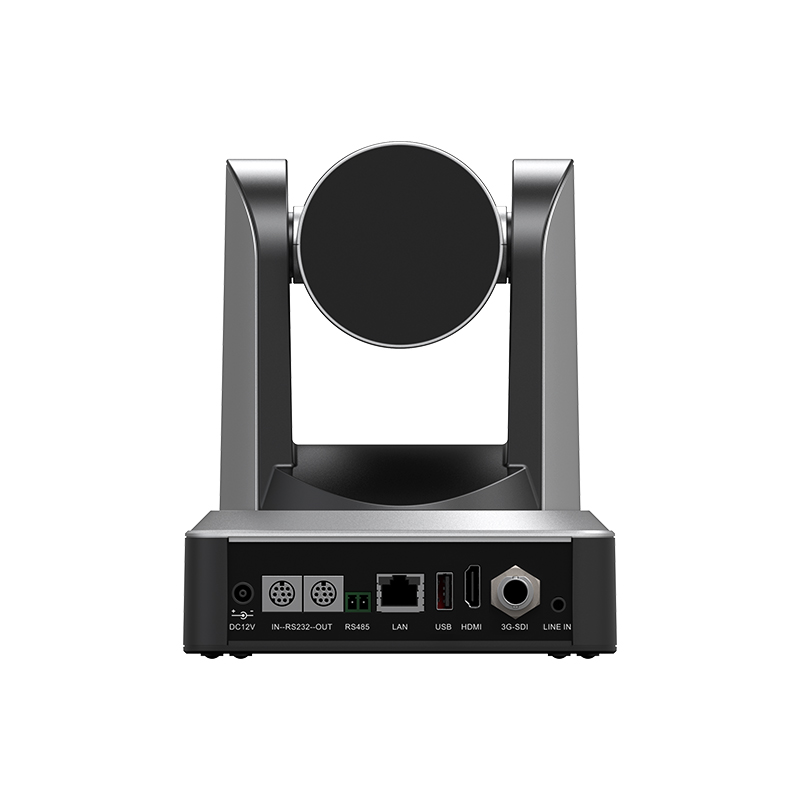
Video output interfaces
The output interface determines how a camera is connected to the rest of the system. Common interfaces in this class include:
- HDMI: Direct connection to monitors, projectors, video switchers, or capture cards.
- SDI: Professional video transmission commonly used in broadcast and event production.
- USB3.0: Connection to computers, often with UVC/UAC protocol support for software compatibility.
- LAN: Network connection for IP streaming, remote control, PoE power, and protocol-based delivery.
Among the TCHD Video models, TC-980S and TC420 include HDMI, SDI, LAN, and USB3.0. The TCHD-T3 is positioned as a USB-first camera with HDMI and RJ45 networking; it also includes a vertical/horizontal screen button for social commerce and e-commerce streaming scenarios.
Compression and streaming protocols
For-network delivery, H.264 and H.265 are common compression standards. USB3.0 output often supports MJPEG, H.264, YUY2, or NV12 so the camera can be used in software without a dedicated capture driver. Network protocol support may include TCP/IP, HTTP, RTSP, RTMP, ONVIF, DHCP, and Multicast. Higher-end PTZ cameras in this segment also list SRT, GB/T28181, NDI, or Dante AV options for low-latency and managed network environments.
The protocol list is a procurement signal. If a church streaming team sends video to an RTMP-based platform, the camera must support RTMP or connect through an encoder that handles RTMP. If a corporate IT team wants standard ONVIF discovery with camera control on an IP network, the camera specification must include ONVIF and IP VISCA or VISCA over IP.
Control and power
Control options usually include RS232, RS485, and IP-based protocols. VISCA, Pelco-D, and Pelco-P are widely used serial protocols in AV installations. Power over Ethernet, such as PoE or PoE+, simplifies installation by carrying data and power in one cable. Power consumption for the model range described here is relatively low, from under 12W to approximately 18W, depending on the camera.
Application patterns across industries
The application notes for the TCHD Video product line list live streaming camera projects in e-commerce, sports broadcasting, outdoor scenic streaming, education lecture capture, medical teaching, and corporate meetings. The working condition data for this camera family is indoor-oriented: -10°C to +50°C and 20% to 80% humidity. Outdoor scenic streaming and field production may require protective housing or purpose-built outdoor cameras.
Common application matches for this product family include:
- Corporate meetings and conference rooms: A PTZ/video conference camera such as the TC420 can be connected by USB to a meeting laptop and by HDMI or SDI to a room display or local recorder.
- Lecture capture and classroom streaming: An education camera with presets and tracking can follow the instructor and return to a preset wide shot. The TC-980S supports tracking modes, and the TCHD-T3 is positioned as an education teaching camera.
- E-commerce and TikTok-style streaming: The TCHD-T3 includes a vertical/horizontal screen orientation button, making it easier to repurpose the same camera for social video and product livestreams.
- Medical teaching and training: Cameras marketed as medical training cameras are not necessarily surgical cameras. They are better suited to teaching rooms, simulation labs, and training sessions where HDMI/SDI output, recording, and conferencing are important.
- Event and church streaming: Broadcasting/event streaming PTZ cameras with multiple outputs, presets, and remote control are common. The camera should support the streaming platform used by the organization, either through an internal encoder or directly through RTMP/SRT network protocols.
Integrated camera versus traditional multi-device streaming chains
The traditional alternative to an integrated live streaming camera is a multi-device chain: a camcorder or interchangeable-lens camera, a video capture card, a separate encoder, and a PTZ controller or operator. That approach provides flexibility but adds complexity.
| Comparison point | Integrated live streaming camera | Camera + separate capture/encode setup |
|---|---|---|
| Signal path | Direct HDMI, SDI, USB, or IP output | Usually camera to capture card, then encoder or software |
| PTZ control | Built-in pan, tilt, presets, VISCA/Pelco/IP control | Depends on camera support, external motorized head, or operator |
| Streaming protocols | Often native RTMP, RTSP, SRT, ONVIF on LAN models | Requires compatible encoder or software gateway |
| Installation complexity | Fewer devices, shorter signal chain | More components, more configuration points |
| Flexibility | Usually fixed lens and fixed imaging platform | More lens, sensor, and creative control options |
| Cost envelope | Predictable for classroom/meeting/event work | Can scale to higher production quality but raises cost and complexity |
This comparison also makes the limits clear. An integrated live streaming camera is not a substitute for a cinema or broadcast camera that needs interchangeable lenses and a large sensor. The lens is fixed, depth-of-field control is limited, and the typical product design is built for indoor installations. Organizations that need multi-angle live production should also confirm that the camera supports remote control and integrations with their existing video mixer or streaming server.
What buyers should watch in the next phase
As IP video workflows expand, camera selection is likely to become more software-defined. Buyers should watch for native support of low-latency transport protocols, improved auto-tracking and intelligent framing, and the availability of multi-output cameras that can serve a local display and a network stream simultaneously.
For an awareness-stage buyer, the practical move is to build a short checklist based on signal paths. A camera with high resolution but no required interface can be harder to integrate than a 1080p camera with the correct HDMI, SDI, USB, or LAN output. Suppliers that also build capture cards, encoders, converters, and video switchers can provide a more complete answer to integration questions.
FAQ
A: A live streaming camera is a camera designed to deliver video into a live production or streaming workflow. In the TCHD Video product family, the term covers PTZ cameras, video conference cameras, education teaching cameras, medical training cameras, e-commerce streaming cameras, and event streaming cameras. These cameras commonly support HDMI, SDI, USB, or LAN output, and some offer network protocols such as RTSP, RTMP, or ONVIF.
A: PTZ refers to mechanical pan-tilt-zoom capability, while video conference camera refers to intended use. In practice, a single model can belong to both categories. For example, the TCHD Video TC420 is categorized as a PTZ camera and a video conference camera. Buyers should compare output interfaces and control features instead of relying on the category name alone.
A: The necessary outputs depend on the other devices in the signal chain. HDMI is common for monitors, projectors, and switchers. SDI is common for professional broadcast and event work. USB3.0 is used when the camera must connect directly to a computer. LAN is used for IP streaming and network control. The TC-980S and TC420 in the TCHD Video line include HDMI, SDI, LAN, and USB3.0, while the TCHD-T3 includes HDMI, USB3.0, and RJ45.
A: Common network protocols in this segment include TCP/IP, HTTP, RTSP, RTMP, ONVIF, DHCP, and Multicast. More advanced cameras may add SRT, GB/T28181, NDI, or Dante AV. The choice depends on the target streaming platform or receiver. RTMP and SRT are widely used for internet live streaming, while ONVIF and VISCA over IP are useful for control and discovery in managed video networks.
A: Yes, if the camera provides a USB interface and supports UVC/UAC communication protocols. UVC support lets the camera appear as a standard video device in Windows, macOS, Linux, and Android without a dedicated capture driver. This is one reason USB camera models such as the TCHD-T3 are used for software-based streaming and conference work.
A: No. A live streaming camera is built for content production, meeting, teaching, or event streaming. A CCTV or surveillance camera is normally built for security monitoring, continuous recording, and alarm workflows. Although many live streaming cameras use IP networks and may support ONVIF, their interface emphasis and intended workflow are different.
A: No. A medical training camera is designed for teaching, simulation, and documentation scenarios. A surgical camera for operating room integration usually requires separate medical-grade specifications, integration features, and compliance work. Buyers should confirm the intended medical use case before selecting a camera.
A: Not necessarily. For direct internet streaming, 1080p at 60fps is still widely used and practical. 4K may be beneficial when the same camera output is used for local recording, post-production, large displays, or future repurposing. Many cameras support multiple streams, allowing higher resolution for local recording and a lower-resolution stream for online delivery.
A: Many live streaming PTZ cameras are specified for indoor environments. The working condition range in the TCHD Video application documentation is -10°C to +50°C with 20% to 80% humidity. Outdoor scenic streaming and field production likely require protective housing or a camera designed for outdoor operation.
Tem questões ou precisa de mais detalhes?
Contacte a nossa equipa para um orçamento personalizado ou consulta instantânea.
Solicitar orçamento
Preencha o formulário abaixo e a nossa equipa entrará em contacto com uma proposta personalizada.
Chat direto do WhatsApp
Prefere conversar em tempo real? Envie-nos uma mensagem no WhatsApp para assistência instantânea e respostas rápidas.
- Obter orçamento personalizado
- Partilhar fotos ou documentos
- Discuta as suas necessidades diretamente
Geralmente responde em 5–30 minutos durante o horário de expediente.