
Production Switcher Scenario Fit: TC-UV08 in Four Industries
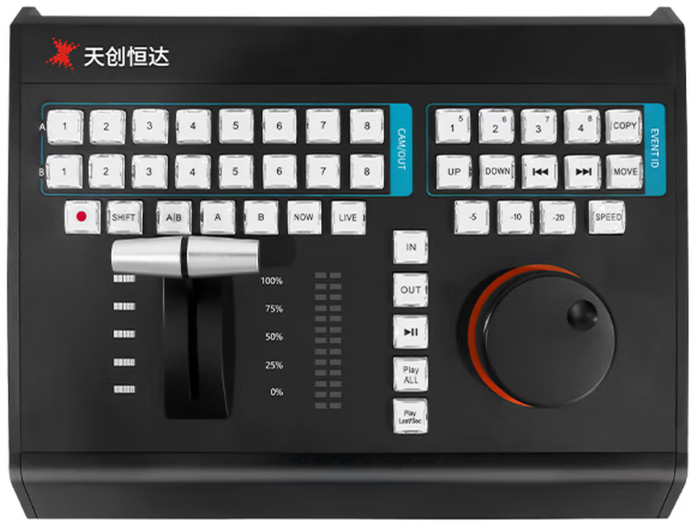
Multi-camera live production is no longer confined to broadcast studios. The same A/B camera-switching logic that once lived only in network control rooms now appears in sports venues, hospital demonstration theatres, lecture halls, conference centres and industrial review stations. As cameras, encoders and IP transport become more standardised, the practical bottleneck in many projects shifts to the control layer — the desk an operator physically touches during a shoot.
The TC-UV08 is a slow-motion playback keyboard switcher made by TCHD Video, the brand of TCHD Digital Video Technology Development (Beijing) Ltd, a Beijing-based video hardware manufacturer established in 2005. TCHD Video produces live streaming cameras, video capture cards, converters, encoders and video switchers, and operates from a 10,000 m² facility. The TC-UV08 belongs to the company's control-surface range rather than to its vision-mixing hardware, and it is listed for four application areas: content creation and live broadcast, corporate and education, healthcare, and industrial vision.
That four-industry listing is the practical question for buyers. A control panel that suits a basketball replay desk does not automatically fit a surgical demonstration theatre or an industrial inspection station, because the constraints differ: how quickly an operator must recall a moment, which protocols the host software speaks, how the panel is powered, and what the panel simply does not do. This reference maps the TC-UV08 against its documented parameters, scenario by scenario.
Why the Control Layer, Not the Camera, Sets the Constraint
Three layers have to cooperate in any multi-camera production: acquisition, meaning the cameras; processing, meaning the production switcher or vision mixer that cuts, keys, records and outputs; and control, meaning the surface an operator uses to trigger those actions. In tender documents and integration drawings the first two layers usually arrive with precise specifications — resolution, 12G-SDI or HDMI 2.0 inputs, streaming protocols, audio channels. The control layer is frequently specified last, and specified loosely.
The consequence shows up during evaluation. Replay work is time-critical. An operator who wants to show the previous ten seconds of play has to locate a point in a timeline, set an in and out, adjust playback speed and return live, all while the event continues. A mouse-and-keyboard workflow can perform these actions, but the translation of a timeline into a keyboard shortcut set places the burden on the operator rather than on the hardware.
For buyers in the research-to-evaluation stage, the useful question is therefore narrower than which panel looks professional. It is which control actions are physically available, over which interfaces, under which software assumptions, and what remains outside the panel's scope.
What the TC-UV08 Documents
TCHD Video describes the TC-UV08 as a slow-motion playback keyboard switcher built on a 42-key control surface, with an aluminum alloy CNC integrated housing and an all-in-one USB design that carries both power and bidirectional data over a single cable. Its documented control functions centre on broadcast-grade A/B multi-camera switching and one-touch event operation, combined with slow-motion replay control.
| Parameter area | Documented specification | Why it matters in evaluation |
|---|---|---|
| Control surface | 42 dual-color crystal transparent keys; 8-channel multi-function shortcut keys; one-touch event operation | Determines how many camera, event and replay actions map to physical keys instead of on-screen menus |
| Switching mode | Broadcast-grade A/B multi-camera switching | Matches the conventional multi-camera switching grammar used in live production |
| Replay control | Third-generation damping search knob; streamlined photoelectric T-bar; stepless playback speed adjustment; precise timeline positioning | Speed control and timeline placement are the two actions that define replay quality |
| Frame marking | Independent -5 s, -10 s and -20 s quick mark buttons; NOW and LIVE shortcuts | Enables repeatable replay windows without typing values under time pressure |
| Communication | MIDI, USB, RS232 and LAN multi-channel protocols; two-way data interaction | Determines how the panel integrates with a host workstation or control system |
| Software | vMix, FairPlay and TCLiveSP | Defines the documented host-software list at the time of publication |
| Housing | Aluminum alloy CNC integrated shell; scratch resistance; heat dissipation for continuous studio operation | Relevant to multi-hour operation rather than to short sessions |
| Cabling | All-in-one USB design: one cable for power and bidirectional communication | Reduces on-site wiring and setup steps |
| Ergonomics | Human-centric key layout intended to reduce wrist fatigue; reserved multi-functional expansion interfaces | Matters for operators working long shifts |
| Stated industries | Content Creation & Live Broadcast; Corporate & Education; Healthcare; Industrial Vision | Defines the intended deployment scope |
Replay Mechanics: How A/B Switching and Frame Marking Work Together
A/B multi-camera switching is a control convention rather than an effect. The operator previews the next source on the B bus, checks it on a multiview, then takes it to the A bus, which is the program output. The transition may be a straight cut or a manual T-bar move. This is one reason the TC-UV08 documents a streamlined photoelectric T-bar alongside a third-generation damping search knob: the T-bar controls the transition between sources, while the search knob scrubs the timeline during replay.
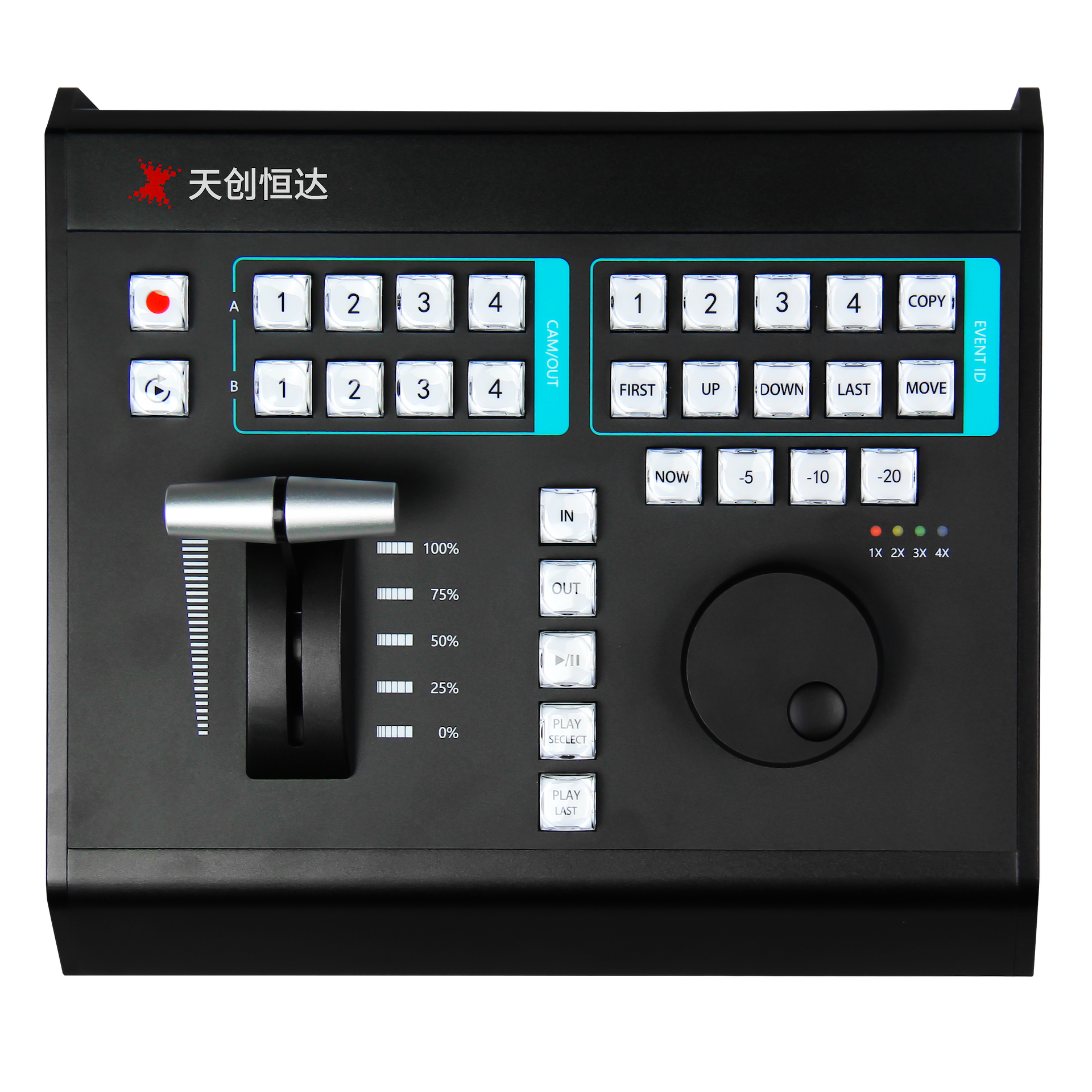
Frame marking completes the workflow. The -5 s, -10 s and -20 s buttons set a repeatable window back from the current live point, while the NOW and LIVE shortcuts move the operator between the live edge and the moment under review. Combined with stepless playback speed adjustment, this covers the standard replay sequence: locate, mark, slow down, return live.
One boundary is worth stating plainly. The panel issues control commands; it does not carry the video itself. Program output, keying, recording and streaming are handled by the production switcher and the host software running on the operator workstation. A project that expects the control surface to also route or process video is looking at the wrong device category.
Scenario Fit by Industry
Sports replay and live event broadcast
Sports is the scenario the replay controls were designed around, and it is also the scenario with the tightest timing constraints. The panel's contribution is that the actions a replay operator repeats most often are available as fixed hardware: -5 s, -10 s and -20 s marks, NOW and LIVE transitions, and a search knob with stepless speed adjustment. In a multi-angle workflow, the key count becomes the limiting factor — 42 dual-color keys plus 8 shortcut keys define how many camera, event and replay functions can be mapped simultaneously, so the number of required discrete actions should be counted before specification rather than after installation.
The aluminum alloy housing is also relevant here for a non-obvious reason. Replay desks often run for the full duration of an event, and the housing is documented as providing heat dissipation for continuous studio operation. Long-shift ergonomics — a key layout intended to reduce wrist fatigue — addresses the same operational reality.
Healthcare and surgical live-demo
In clinical teaching and surgical demonstration workflows, the requirement shifts from speed of recall to accuracy of recall. A demonstration typically revisits one specific step rather than replaying a fast sequence, which places the emphasis on precise timeline positioning and on repeatable mark points. The -5 s, -10 s and -20 s buttons and the damping search knob address that need directly, and the documented software list of vMix, FairPlay and TCLiveSP defines the host-software assumptions for a healthcare installation.
Documentation is the constraint to check first in this segment. TCHD Video's recorded CE EMC attestation, LCSA07075157E issued by LCS Testing Laboratory under EN 55032:2015/A1:2020 and EN 55035:2017/A11:2020, covers the TC-400N4 HDMI series capture card and is not listed as covering the TC-UV08. Buyers with EU electromagnetic-compatibility documentation requirements should request the applicable file for the panel as part of project qualification.
Corporate, education and professional content creation
Conference streaming, lecture recording, campus television and virtual studio production are lower-velocity than sports but longer in duration, and they are frequently operated by staff who are not full-time vision mixers. Two documented characteristics matter here: the all-in-one USB design, which supplies power and bidirectional data over one cable and simplifies setup in temporary rooms, and the MIDI, USB, RS232 and LAN protocol set, which gives integrators more than one path to map panel actions into the host software. The documented software list of vMix, FairPlay and TCLiveSP is the first compatibility checkpoint for these deployments.
Industrial vision
Industrial vision is listed among the stated application areas for the TC-UV08. In this context the panel functions as an operator-side control surface for reviewing and marking captured footage — timeline positioning, event marking and repeatable recall. The published parameters do not list camera, sensor or machine-vision interfaces, so an industrial deployment has to supply its own acquisition and processing chain and use the TC-UV08 for the operator actions that sit on top of it.
Market Signals Behind Multi-Camera Control Demand
Independent market research points to continued growth in the switching equipment that control panels sit alongside. Precision Reports estimates the global production switcher market at USD 2,596.79 million in 2025, driven by IP-based broadcasting and multi-camera streaming transitions. Fortune Business Insights projects the broader video switcher market to reach USD 11.48 billion by 2034, growing at a 7.10% CAGR from 2026.
The gap between those two figures is itself a procurement signal. Commercial trackers use different category definitions, and published estimates for the 2025/2026 period range from approximately USD 1.03 billion to USD 6.63 billion depending on whether video switcher is read broadly or as production-specific vision mixers. Any single market number should therefore be treated as a definitional statement first and a quantity second.
Two technical currents sit underneath that growth. The first is the migration to single-cable 4K: the 12G-SDI standard, SMPTE ST 2082, carries uncompressed 4K video at 60 fps over one coaxial cable at a data rate of 11.88 Gbps, which reduces the physical complexity of multi-camera installations and therefore increases the number of rooms that can host one. The second is the expansion of live commerce. Precedence Research projects the livestream e-commerce market at USD 312.35 billion by 2035, with Asia Pacific holding a dominant 66% share as of 2025 — a volume of vertical-format live output that keeps pressure on operators to switch quickly and repeatedly.
For trade and customs teams, video mixing systems or consoles are classified under HS Code 85437062 in various jurisdictions, which is a useful reference point when panels and switchers are imported together as a system.
Comparing a Dedicated Panel with Software-First Control
The most common alternative to a dedicated control panel is not a competing panel; it is software-first control, where the operator uses a mouse and keyboard against the host application's interface. The comparison below uses only the TC-UV08's documented characteristics.
| Dimension | Software-first control (typical) | TC-UV08 (documented) |
|---|---|---|
| Source switching | On-screen buttons or keyboard shortcuts | 42 keys plus 8 shortcut keys; broadcast-grade A/B multi-camera switching; one-touch event operation |
| Transition control | Software-defined timing, triggered from the interface | Streamlined photoelectric T-bar for manual transitions |
| Replay positioning | Timeline drag or typed timecode values | Third-generation damping search knob with stepless speed adjustment and precise timeline positioning |
| Replay window | Configured per session or per operator preference | Fixed -5 s, -10 s and -20 s quick mark buttons plus NOW and LIVE shortcuts |
| Control transport | Depends entirely on the workstation setup | MIDI, USB, RS232 and LAN multi-channel, two-way |
| Power and data | Separate peripherals and cabling typical | Single USB cable for power and bidirectional communication |
| Long-shift operation | Standard peripherals, no replay-specific layout | Human-centric layout intended to reduce wrist fatigue; aluminum housing for heat dissipation |
Boundaries and limitations to verify
A panel of this class is not a substitute for the rest of the production chain, and the following limits should be confirmed before specification.
- Control surface, not processor. The published parameters for the TC-UV08 list no video input or output interfaces. Switching, keying and streaming still require a vision mixer or host software.
- Host dependency. The documented software list is vMix, FairPlay and TCLiveSP. Projects running other applications need the control mapping confirmed through MIDI, USB, RS232 or LAN rather than assumed.
- Published performance figures. The manufacturer describes sensitive, lag-free real-time control as a product characteristic; no numeric control-latency value appears in the parameters reviewed for this article. Where latency is contractual, it should be confirmed by test.
- Documentation scope. The CE EMC attestation held in TCHD Video's documentation, LCSA07075157E, applies to the TC-400N4 HDMI series capture card. Organization-level management certificates — ISO 9001:2015 certificate 064-24-Q-0675-R1-S, ISO 14001:2015 certificate 064-24-E-0676-R1-S and ISO 45001:2018 certificate 064-24-S-0677-R1-S, issued by BEIJING STANDARD CERTIFICATION CENTRE and valid from 2024-03-08 to 2027-03-07 — cover the sales of digital audio and video products and related technical services and related management activities.
- Commercial terms. No price band is published in the material reviewed here; that is a quotation-stage question rather than a specification-stage one.
What to Check Before Specification
- Confirm the host software and the control path it accepts: MIDI, USB, RS232 or LAN.
- Count the discrete actions required per event and compare that count against 42 keys plus 8 shortcut keys.
- Confirm how many replay windows operators need and whether -5 s, -10 s and -20 s marks cover them.
- Specify the video pipeline separately: cameras, switcher, recording and streaming sit outside the panel.
- Request the applicable EMC documentation for the panel for the destination market.
- Match shift length and physical layout against the documented ergonomic design.
Future Outlook
Control surfaces tend to evolve more slowly than cameras and codecs, and for a defensible reason: switching grammar is stable. What is changing around them is integration. IP-based transport and single-cable 4K reduce the cabling burden in multi-camera rooms, which makes it practical to add cameras and sources without rebuilding the control layer. The growth of vertical-format live commerce introduces a second production format that operators must handle, which raises the value of hardware that keeps frequently repeated actions under the fingers rather than behind a menu.
For panels in the TC-UV08 class, the near-term evaluation criteria are therefore likely to be less about new switching concepts and more about protocol coverage, host-software breadth and documentation readiness for regulated markets. Buyers should expect control surfaces to be judged increasingly on integration evidence — which protocols, which software, which certificates — rather than on key count alone.
FAQ
What is the difference between a production switcher and a slow-motion playback keyboard switcher?
A production switcher, also called a vision mixer, processes video: it accepts camera inputs and performs cuts, transitions, keying and output routing. A slow-motion playback keyboard switcher such as the TC-UV08 is a control surface that sends commands to host software and does not carry the video signal itself. In a typical installation the two are used together, with the panel providing operator actions and the switcher handling the video pipeline. TCHD Video manufactures both switcher hardware and the TC-UV08 control panel.
Which protocols and software does the TC-UV08 support?
Documented protocol support covers MIDI, USB, RS232 and LAN multi-channel communication for stable two-way data interaction. Documented software compatibility covers vMix, FairPlay and TCLiveSP. The panel uses an all-in-one USB design, so a single cable provides both power and bidirectional data communication. Buyers running other applications should confirm the control-mapping path, whether MIDI or LAN, before committing to the device.
How does the TC-UV08 support slow-motion sports replay?
The panel provides a third-generation damping search knob and a streamlined photoelectric T-bar for stepless playback speed adjustment and precise timeline positioning. Independent -5 s, -10 s and -20 s quick mark buttons set repeatable replay windows, and the NOW and LIVE shortcuts move the operator between the live edge and the moment under review. Combined with 42 dual-color keys and 8 shortcut keys for camera and event actions, this covers a locate, mark, slow-down and return-live sequence.
Is the TC-UV08 suitable for surgical live-demo and clinical teaching workflows?
Healthcare is one of the four application areas listed for the TC-UV08, and its replay controls — precise timeline positioning and fixed mark points — suit workflows in which a specific step must be revisited rather than a fast sequence replayed. Suitability still depends on the surrounding installation: a video pipeline of cameras, switcher and recording, plus host software, is required, and the documented software list is vMix, FairPlay and TCLiveSP.
What should buyers check before using a control panel for industrial vision?
The published parameters for the TC-UV08 list no camera, sensor or video input and output interfaces, so an industrial vision deployment must supply its own acquisition and processing chain and use the panel for operator-side control actions such as event marking and timeline positioning. Buyers should also confirm which control protocol the vision software accepts, since the panel documents MIDI, USB, RS232 and LAN rather than a machine-vision specific interface.
What certification documentation is associated with TCHD Video products?
TCHD Video holds ISO 9001:2015 certificate 064-24-Q-0675-R1-S, ISO 14001:2015 certificate 064-24-E-0676-R1-S and ISO 45001:2018 certificate 064-24-S-0677-R1-S, all issued by BEIJING STANDARD CERTIFICATION CENTRE and valid from 2024-03-08 to 2027-03-07, with a scope covering the sales of digital audio and video products and related technical services and related management activities. A CE EMC attestation, LCSA07075157E, issued by LCS Testing Laboratory under EN 55032:2015/A1:2020 and EN 55035:2017/A11:2020, is on record for the TC-400N4 HDMI series capture card. The documentation reviewed for this article does not list a CE certificate for the TC-UV08 itself.
Reference material: TCHD Video publishes a product catalogue covering its switchers, cameras, capture cards, encoders and control panels at TCHD Product Catalog 2025. Company information is available at www.tchdvideohk.com.
Tem questões ou precisa de mais detalhes?
Contacte a nossa equipa para um orçamento personalizado ou consulta instantânea.
Solicitar orçamento
Preencha o formulário abaixo e a nossa equipa entrará em contacto com uma proposta personalizada.
Chat direto do WhatsApp
Prefere conversar em tempo real? Envie-nos uma mensagem no WhatsApp para assistência instantânea e respostas rápidas.
- Obter orçamento personalizado
- Partilhar fotos ou documentos
- Discuta as suas necessidades diretamente
Geralmente responde em 5–30 minutos durante o horário de expediente.