
Shortlist Ready: Top 5 GZKEDRO Configurations for a Smart Lobby Installation
Industry Reference — Commercial Display
A smart lobby is not a single screen. It is a set of display roles — arrival check-in, greeting, wayfinding, meeting-room booking and brand presentation — that have to coexist on one floor plate and, ideally, behind one content and service layer. Buyers who treat the lobby as five separate purchases usually end up with five separate operating routines.
The scale of the category explains why this matters commercially. Grand View Research estimated the global commercial display market at USD 53.65 billion in 2024, with digital signage accounting for more than 53.73% of revenue share. Much of that spend now lands in hybrid environments such as corporate lobbies, hotel arrivals, clinics, showrooms and mixed-use buildings, where a display is expected to perform more than one job.
This shortlist translates that expectation into five concrete lobby configurations available from GZKEDRO (Guangzhou Kedro Electronics Technology Co., Ltd.), a Guangzhou-based manufacturer of commercial display screens and intelligent interactive devices founded in 2013, with research and development centres in Guangzhou and Shenzhen and roughly 80% of output exported to global markets. Each configuration below is described by the lobby role it serves, the verified capability behind it, and the conditions under which it stops being the right choice.
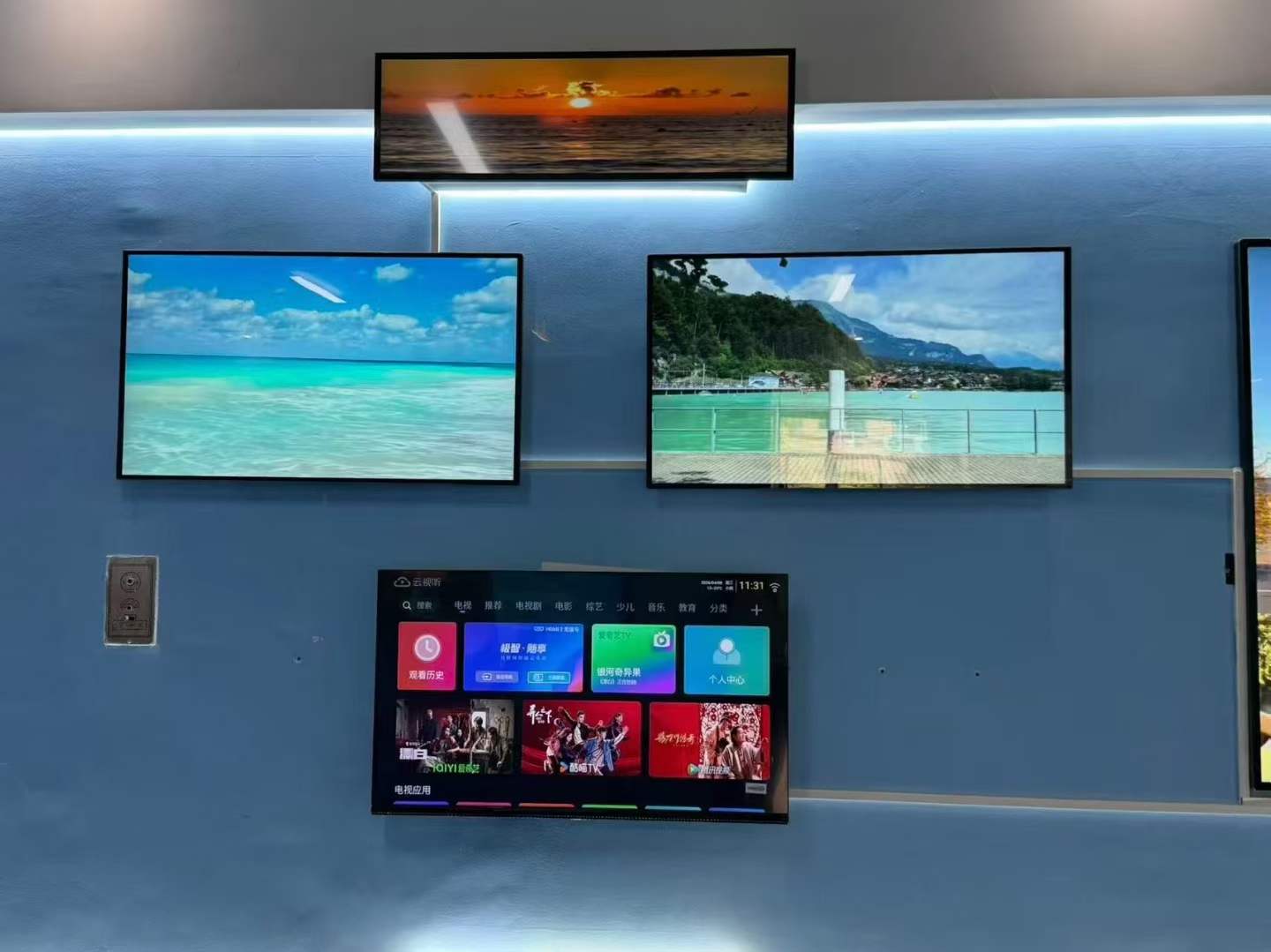
Lobby environments concentrate several display roles — arrival, wayfinding, greeting and brand presentation — within a single circulation area.
The Procurement Problem: Lobby Displays Are Specified One at a Time
Lobby projects rarely fail because a screen was too small. They fail because the arrival kiosk, the wayfinding screen and the conference-floor booking panel were bought from different suppliers, on different software stacks, with different warranty terms and different spare-part lists. The result is a lobby that looks complete on handover day and becomes expensive to operate within the first year.
Three procurement patterns create most of that friction:
- Role overlap without an owner. Several displays can display the same announcement, but nobody owns the content calendar that feeds them.
- Interaction mismatch. A touch display is specified where scheduled playback would have been sufficient, or a static screen is specified where visitors genuinely need to self-register.
- Serviceability gaps. Devices are chosen on visual specification alone, without a defined path for remote updates, calibration or replacement.
The practical opportunity is not a bigger screen. It is a shorter supplier list, a shared management layer and a configuration logic that can be phased over one or two budget cycles instead of being replaced entirely when the first phase underperforms.
What a Lobby Shortlist Has to Prove Before It Is Approved
For evaluation-stage buyers, the useful question is not "which display is best" but "which configuration carries the fewest unresolved obligations". Six criteria do most of that work:
| Criterion | What the buyer is checking | Why it decides the shortlist |
|---|---|---|
| Role clarity | Does the device have one primary job in the lobby? | Devices with three jobs usually perform none of them consistently. |
| Interaction model | Touch, gesture, passive playback or self-service | Drives both hardware class and software integration scope. |
| Content operations | Who updates content, how often, and from where | Remote-managed estates age better than manually loaded ones. |
| Uptime design | Thermal design, power protection, recovery behaviour | Lobby displays run long daily cycles in visible places. |
| Compliance and documentation | Certifications, test records, safety standard alignment | Required for handover in many building and corporate projects. |
| Phasing path | Can the estate grow without replacing phase one? | Protects the first investment if the rollout is staged. |
The Shortlist: Five GZKEDRO Configurations for a Smart Lobby
| # | Configuration | Primary lobby role | Interaction model |
|---|---|---|---|
| 1 | KD-SSK Series Self Service Kiosk | Arrival check-in and visitor registration | Self-service touch |
| 2 | KD-DH Series Holographic Digital Human | Greeting and brand moment | AI smart display, non-contact |
| 3 | KD-IFPD Series Interactive Flat Panel | Meeting-room booking and collaboration | Multi-touch, wireless sharing |
| 4 | KD-AD Series Advertising Display | Wayfinding, announcements, promotions | Scheduled network playback |
| 5 | LED Video Wall and Transparent Display configuration | Brand wall and showcase vitrine | Centralised playback; transparent presentation |
1. KD-SSK Series Self Service Kiosk — The Arrival Gate
The KD-SSK Series Self Service Kiosk takes the first queue out of the lobby: visitor registration, appointment confirmation, badge issuance or queue ticketing. It belongs to the interactive display class, which uses multi-touch input, infrared sensing and — where the application supports it — AI gesture recognition to keep the interaction short. As with other GZKEDRO display products, the kiosk estate can be managed through the company's remote cloud control platform, which supports remote deployment, monitoring and maintenance of devices across sites.
Where it earns its place: buildings with a reception desk that handles a high volume of short, repeatable transactions, and multi-tenant buildings where each tenant wants a different arrival flow.
Boundary condition: a self-service kiosk is only as good as the systems it talks to. If the visitor-management, access-control or tenant directory integration is not scoped before purchase, the kiosk degrades into an expensive touch directory. For a single-entrance office with fewer than a few dozen visitors a day, a standard commercial display with a live directory may deliver the same outcome at lower integration cost.
2. KD-DH Series Holographic Digital Human — The Greeting Layer
The KD-DH Series Holographic Digital Human is the configuration that changes how a lobby feels rather than how it flows. It sits in the AI smart display category: an animated, conversational digital human used for greeting, brand storytelling and directional prompts. It is a non-contact experience, which matters in environments where visitors should not have to touch a shared surface.
Where it earns its place: flagship entrances, showrooms, exhibition reception areas and hospitality arrivals where the emotional first impression is part of the commercial brief.
Boundary condition: the hardware is the smaller part of the obligation. A digital human needs a script, a language set, an escalation path to a human host and periodic content refresh. Ambient light and the background behind the unit also affect perceived clarity, so placement should be decided in the room, not on a floor plan. Buyers should treat content production as a recurring line item rather than a one-off installation cost.
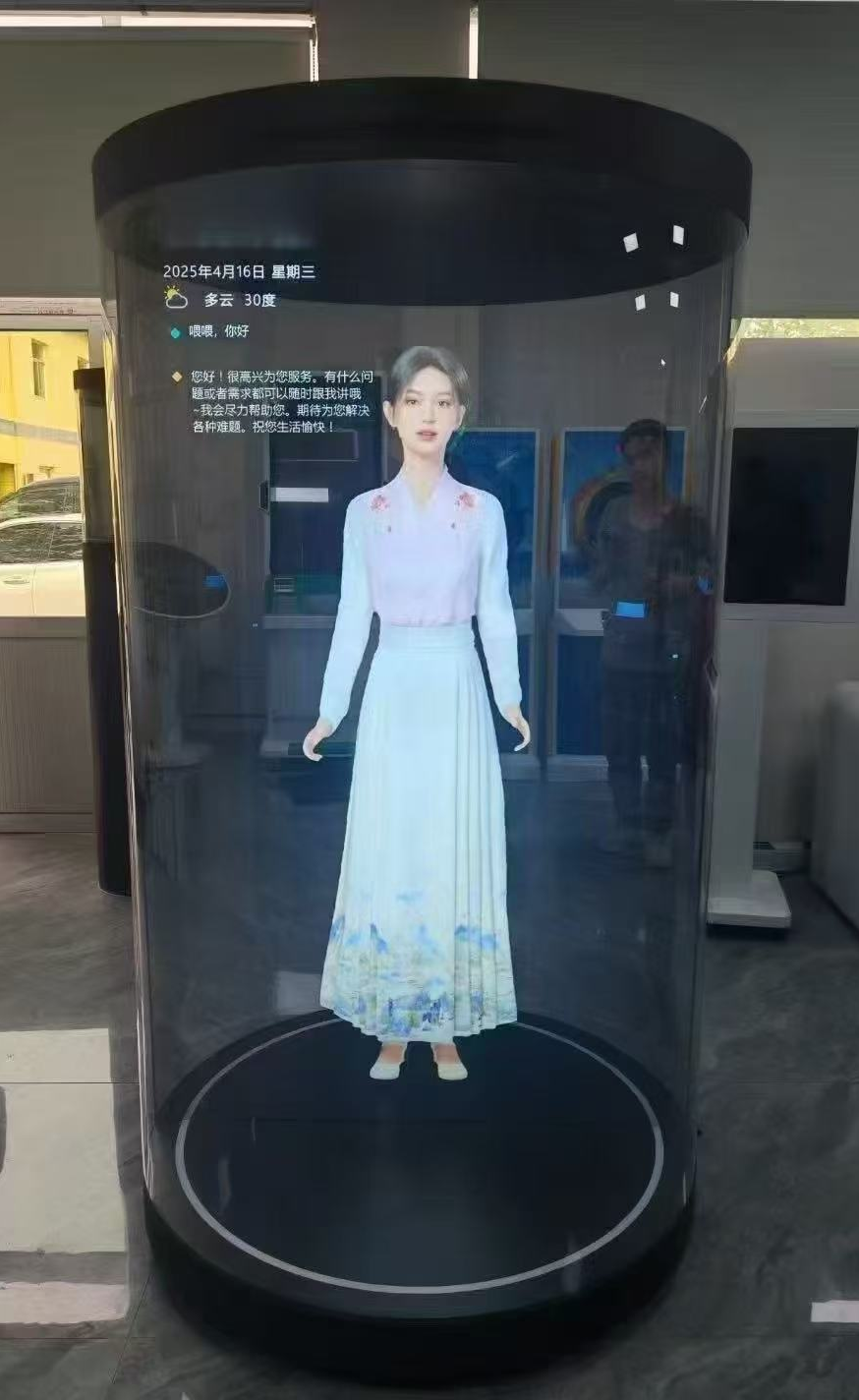
A holographic digital human configuration is placed for first-impression value; content scripting and placement decide the result more than panel size.
3. KD-IFPD Series Interactive Flat Panel — The Meeting-Room Handoff
The KD-IFPD Series Interactive Flat Panel is usually classified as a conference display, but in a smart lobby its first job is booking. Mounted at the lift lobby or reception, it shows room availability and lets staff or visitors reserve a space directly. In the room itself, the same panel class supports multi-touch annotation, screen projection and wireless sharing.
GZKEDRO's comparison framework for this category positions interactive conference displays as improving meeting efficiency by up to 60% relative to conventional screens, and cites faster customer interaction and higher operational efficiency as the general performance gap between standard monitors and interactive displays. Those figures describe the category comparison rather than a single installation, but they explain why the booking panel is often the configuration that justifies itself fastest inside a corporate lobby.
Boundary condition: the panel needs to be connected to a room-scheduling system to display live availability. Without that link it is a well-built screen showing a static floor plan. Touch modules also require periodic calibration over the service life of the panel, which should be reflected in the maintenance agreement.
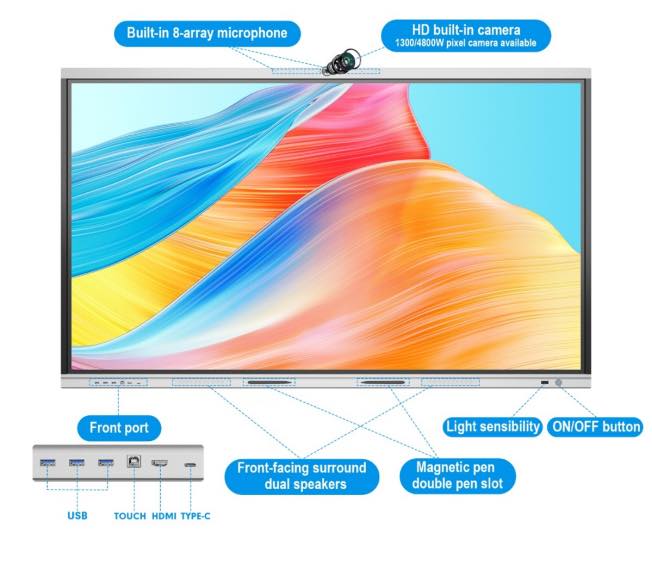
The interactive flat panel configuration bridges the lobby and the meeting floor: availability at the lift lobby, collaboration inside the room.
4. KD-AD Series Advertising Display — The Dynamic Messaging Layer
The KD-AD Series Advertising Display carries the messages that a lobby produces continuously: wayfinding, tenant notices, event schedules, promotions and emergency information. Compared with traditional advertising displays, this product class uses dynamic multimedia and real-time content updates, and GZKEDRO's commercial comparison data cites a 40% reduction in printing costs relative to alternatives, alongside remote CMS management and scheduled, split-screen networked playback.
Where it earns its place: any lobby that currently prints and replaces physical notices, or that runs different messages for different audiences across the day.
Boundary condition: the 40% printing-cost reduction is a category comparison, not a guarantee for every site; the saving only materialises if the organisation actually retires the print process it replaces. The configuration also assumes someone owns the content calendar. Screens showing outdated notices create more credibility damage than an empty wall.
5. LED Video Wall and Transparent Display Configuration — The Brand Wall
The fifth slot is a configuration rather than a single unit. For lobbies with a large uninterrupted wall, a video wall display delivers large, seamless visual presentation and a level of visual impact that single panels cannot match, and it is the format most often used for command centres, stages and building brand walls. Where the lobby includes a showcase vitrine, a transparent display performs the opposite task: transparent visual advertising technology that keeps the object behind the glass visible while overlaying information in front of it — a format widely used in luxury retail and exhibition environments.
Boundary condition: these are the two configurations with the heaviest site requirements. Video walls need structural mounting provision, dedicated power planning, centralised display management and periodic calibration to keep seams consistent. Transparent displays are chosen for showcase contexts specifically because the background remains visible, which means content has to be designed around whatever sits behind the panel — dense, high-coverage graphics tend to defeat the purpose. Buyers should specify these only where the lobby has the geometry and the electrical plan to support them.
The Shared Platform Behind All Five Configurations
The reason these five configurations can sit on one shortlist is that they share a technology base rather than being five unrelated products.
- Display layer. GZKEDRO's commercial displays use advanced 4K display panels intended for vivid colour and clear detail; the company's category comparison cites up to 4x clearer visual performance for 4K commercial panels versus traditional display classes.
- Interaction layer. Multi-touch, infrared sensing and AI gesture recognition provide the human-computer interaction across interactive models, with industrial-grade touch modules and calibration systems used to maintain accuracy over time.
- Management layer. A remote cloud control platform supports remote deployment, monitoring and maintenance of devices worldwide — the mechanism that allows a lobby estate to be updated without sending a technician to every floor.
- Energy layer. Smart energy-saving systems, automatic brightness adjustment and smart standby power saving are positioned in the category comparison as the efficiency gap between commercial displays and conventional screens.
For evaluation teams, the practical consequence is a single spare-part strategy, a single content workflow and a single point of accountability — which is usually worth more in a lobby than any individual specification advantage.
Designing for Uptime: Where Lobby Installations Fail
Lobby displays are unforgiving devices. They run long daily cycles, sit in sight of visitors, and are often installed near entrances where dust, humidity and temperature swings are part of the environment. GZKEDRO's risk-control framework identifies five recurring failure modes and the corresponding engineering controls:
| Risk type | Control method |
|---|---|
| Overheating | Intelligent temperature control system and cooling design |
| Water infiltration | IP65/IP66 waterproof structure and sealed cabinet |
| Abnormal system crash | Stable Android/Windows operating system with watchdog recovery mechanism |
| Voltage fluctuation | Surge protection and industrial-grade power management |
| Touch function failure | Industrial-grade touch module and calibration system |
Before shipment, the corresponding enterprise measures include a 72-hour aging test with real-time temperature monitoring, waterproof testing and environmental reliability inspection, software validation with OTA updates and remote technical support, power stability testing and component quality inspection, and functional testing and quality control prior to delivery.
The IP65/IP66 sealed-cabinet control is relevant to lobby units placed in semi-exposed entrance zones or porte-cochère areas; interior lobby models do not require the same ingress protection, but the thermal and power-protection disciplines apply to all five configurations.
Market Signals Buyers Should Weigh in 2026
Three category trends shape how a lobby shortlist will age.
Holographic and digital-human formats are the fastest-moving segment. Fortune Business Insights projects the holographic display market growing from USD 5.42 billion in 2026 to USD 33.36 billion by 2034, at a CAGR of 25.52%. Estimates in this segment diverge materially between research houses because of differences in how software and specialised hardware are counted, so buyers should treat any single holographic forecast as directional rather than precise.
Transparent displays are moving from exhibition novelty to fixture. Global Market Insights valued the transparent display market at USD 2.84 billion in 2023 and expects it to reach USD 81.5 billion by 2032, driven in part by augmented-reality integration — a trajectory that supports including a transparent vitrine in a lobby master plan even if it is not purchased in phase one.
Demand remains concentrated but distributed. Grand View Research reports North America held a 35.6% revenue share of the global digital signage market in 2025, the largest regional market, while commercial and large-format display leadership is identified with suppliers such as Samsung Electronics and LG Display. For project buyers, the practical implication is that mid-size manufacturers compete on configuration fit, integration flexibility and service responsiveness rather than on panel technology alone.
Safety compliance has also shifted. IEC 62368-1 is now the primary safety standard for commercial displays (audio/video and IT equipment), replacing the legacy IEC 60950-1 and IEC 60065 standards. Specification documents written against the older standards should be updated before tender.
Comparison with Traditional Solutions — and the Honest Limits
The clearest way to justify a smart lobby budget is to compare each configuration against the traditional solution it replaces.
| Traditional approach | Lobby configuration | Documented gap | Where it fits |
|---|---|---|---|
| Printed notices and static posters | KD-AD Series Advertising Display | Dynamic multimedia and real-time content updates; 40% reduction in printing costs versus alternatives | Retail, malls, restaurants, exhibitions |
| Static display | LED display | Ultra-high brightness and outdoor visibility | Outdoor advertising and smart-city projects |
| Conventional screen | Conference display | Interactive collaboration and wireless sharing; up to 60% meeting-efficiency improvement cited for the category | Conference rooms and education |
| Normal signage | Video wall display | Large seamless visual presentation and greater visual impact | Command centres and stage events |
| Standard display | Transparent display | Transparent visual advertising technology | Luxury retail and exhibitions |
| Traditional monitor | Interactive display | Multi-touch and intelligent interaction; faster customer interaction | Smart retail and education |
Those gaps are real, but they are category-level comparisons. Three limits deserve equal weight in the decision:
- Integration, not hardware, sets the timeline. Four of the five configurations depend on an external system — visitor management, room scheduling, content management or building wayfinding. Projects that purchase hardware first and scope integration second routinely slip past their opening date.
- Operating cost shifts rather than disappears. Replacing print with digital signage removes recurring print spend but adds content operations, device management and, for holographic and transparent formats, ongoing creative production.
- Not every lobby needs all five. A single-tenant office lobby with predictable traffic may be best served by two: an advertising display for messaging and an interactive flat panel for room booking. Specifying the full stack where only two roles exist raises integration load without improving the visitor experience.
Future Outlook
The direction of travel in lobby design is toward fewer, better-managed screens rather than more screens. Three shifts are likely to define the next procurement cycle.
First, cloud-managed estates are becoming the default expectation. A lobby installation that cannot be updated, monitored and diagnosed remotely will be harder to justify as soon as the estate grows beyond one building.
Second, interaction expectations are widening from touch to touch-plus-gesture and, in greeting contexts, to conversational digital humans. The holographic segment's projected growth from USD 5.42 billion in 2026 to USD 33.36 billion by 2034 reflects that widening, even allowing for the wide spread between research estimates.
Third, compliance documentation is moving up the evaluation checklist. With IEC 62368-1 now the primary safety standard for commercial displays, tender documents that still reference IEC 60950-1 or IEC 60065 will need revision — a small change that can affect supplier qualification.
For buyers assembling a smart lobby shortlist today, the defensible approach is to lock the roles first, confirm the integration and compliance evidence second, and select hardware last. The five configurations above are designed to be specified in that order.
Frequently Asked Questions
1. What does "smart lobby" mean in commercial display terms?
A smart lobby combines several display roles — arrival check-in, greeting, wayfinding, meeting-room booking and brand presentation — that operate from a shared content and device-management layer rather than as isolated screens.
2. How does an interactive display differ from standard digital signage in the same lobby?
The difference is the interaction model. Standard digital signage runs scheduled, one-way playback. An interactive display adds multi-touch input, infrared sensing and, in some models, AI gesture recognition, so visitors can complete a task rather than just receive a message. GZKEDRO's category comparison describes the gap between traditional monitors and interactive displays as faster customer interaction and higher operational efficiency, with conference displays cited at up to 60% meeting-efficiency improvement versus conventional screens.
3. What reliability and testing evidence should be requested before approving a lobby deployment?
Ask for the aging and environmental test record, the power-stability and component-inspection scope, and the software validation and update process. In GZKEDRO's framework this includes a 72-hour aging test with real-time temperature monitoring, waterproof testing and environmental reliability inspection, software validation with OTA updates and remote technical support, power stability testing, and functional testing and quality control before delivery. Product certifications cited for the range include CE, FCC, RoHS and ISO9001, and safety alignment with IEC 62368-1, the standard that replaced IEC 60950-1 and IEC 60065 for AV and IT equipment.
4. Which configuration should be deployed first if the lobby budget only covers one phase?
Start with the touchpoint that currently creates the most measurable delay or manual work. In offices with heavy visitor traffic that is usually arrival check-in; in buildings where meeting rooms are contested, it is the booking panel; in buildings that print and replace large volumes of notices, it is the advertising display with network playback. The greeting and brand-wall configurations are the least process-critical, so they are typically phased second.
5. Where do these configurations stop being the right fit?
Self-service kiosks lose value without visitor-management or directory integration. Holographic digital human units carry recurring content-production requirements that small sites may not sustain. Video walls require structural, power and calibration planning that some lobbies cannot accommodate. Transparent displays depend on a showcase context with a visible background. Lobbies with low traffic and no integrated processes are usually better served by a plain commercial display running scheduled content.
Reference material: The GZKEDRO product catalogue covering commercial displays, self-service kiosks, interactive flat panels, advertising displays and AI digital human units is available for download: Kedro Product Catalog (English Edition) — with AI Humans.