Stylus Pen Decision Framework: Passive vs Active, iPad vs Android
The global stylus pen market was valued at USD 19.45 billion in 2025, according to IMARC Group, while Dataintelo projects that active stylus technology will grow at a CAGR of 9.8% between 2026 and 2034. Those two figures cover different slices of the same category — and that overlap is the first complication a buyer has to work around.
Stylus pen is not a single product class. It covers battery-free capacitive pens that replace a fingertip, powered pens that transmit signals into a tablet touch layer, platform-specific pens tied to one ecosystem, and cross-platform models specified for both iPad and Android hardware. This article sets out a decision framework in the order procurement decisions actually occur: device compatibility first, then passive versus active technology, then the Apple Pencil benchmark, then feature-to-workflow matching, and finally verification and procurement criteria. Worked examples come from the published specifications of Dongguan Jiayao Intelligent Technology Co.,Ltd — a stylus pen manufacturer based in Dongguan, Guangdong, China, founded in 2021, operating a 2,700 m² factory with 100 employees and an annual output of 3,000,000 units, trading in this category as Jiayao Stylus. The framework itself does not depend on any single supplier.
Why stylus pen selection is harder than it should be
Buyers rarely lack options; they lack a way to compare them. One reason is that published market numbers disagree. IMARC Group puts the global stylus pen market at USD 19.45 billion for 2025, while Fortune Business Insights reports USD 3.36 billion for the same year. The gap is best explained by definition rather than by data error: one estimate treats a broad input-device category, the other counts active digital pens only. If the category boundary itself is unstable in industry research, it is not a reliable basis for a purchase decision either.
A second reason is vocabulary. Within a single manufacturer line-up, the S3-GC is documented as an Android universal stylus pen, while the R3-P is documented as a universal stylus for iPad and Android tablets. Both are described as universal. The word tells a buyer almost nothing about which devices the pen will actually operate on — only the compatibility statement does.
Step 1: Fix the device before comparing pens
Before any comparison of tips, batteries or charging methods, three device facts should be written down: the exact tablet model and operating system version, the primary task the pen will perform, and whether the pen must work across more than one platform.
On iPad, several active stylus models carry a compatibility statement of iPad models released in 2018 or later running iPadOS 12.2 or above. That group includes the A7-H-L, A8-RH, A21B, A30-B, W3-H, W12-A and W13-A. The compatibility floor matters more than any feature list: a pen with strong specifications is worthless on a device it does not support.
Android does not currently offer an equivalent single statement, because the platform spans multiple digitiser implementations. In practice, buyers either select a pen documented as an Android universal stylus, such as the S3-GC, or select a cross-platform model documented for iPad and Android tablets, such as the R3-P.
Standards do exist at the protocol level. The USI 2.0 specification, released in 2022 by the Universal Stylus Initiative with backing from Google, Intel and Lenovo, is the primary cross-platform standard for active styluses. For buyers procuring Android or ChromeOS-style fleets at volume, standards alignment becomes a legitimate specification question. For iPad procurement, the vendor compatibility list remains the controlling document.
Step 2: Passive or active — the fork in the decision
The passive-versus-active question is settled by how the pen works, not by price. An active stylus is powered by its battery and transmits weak electrical signals to the touchscreen; the tablet detects those signals to locate the tip position and render accurate writing, drawing and tapping. That architecture is what makes palm rejection, tilt sensing and precise input possible. A passive stylus has no battery and no signal path — it works by mimicking a finger.
| Decision dimension | Passive (capacitive) stylus | Active stylus pen |
|---|---|---|
| Power source | None; no battery to charge | Internal battery; the pen must hold charge before it can function |
| Palm rejection | Not supported | Supported on specified models |
| Tilt sensing | Not supported | Supported on specified models |
| Writing behaviour | Finger replacement; latency and offset conditions can occur | Precise writing, with published specifications listing no offset and no delay on models such as E3-A, A7-H-L, A8-RH, A21B, A30-B and R3-P |
| Typical fit | Casual navigation, tapping, menu operation | Note-taking, drawing, sketching, education workflows, tablet gaming |
| Supply-chain profile | Simpler, fewer components | Battery, PCBA, charging circuit and charge management add complexity |
A practical rule follows from that comparison: if the stylus only needs to replace a finger, a passive stylus is sufficient. If the work involves note-taking, drawing or sketching, an active stylus is the appropriate choice — the operating experience is materially better than a passive pen, and the tablet's own software features, such as palm rejection, become usable.
The trade-off runs in both directions. An active pen introduces a battery dependency: it must hold charge to function at all, which is why the range includes automatic power-off behaviour (10 minutes on most models, 60 minutes on the E3-A and R3-P) and one-year standby specifications at full power. In shared-device settings where charging discipline is unreliable, that dependency is a real operating cost rather than a footnote.
Step 3: iPad or Android — what compatibility actually means
Compatibility is not binary. It defines the device list, the input features available on that device, and which charging architecture the buyer is committing to.
Platform-specific iPad models in this range support magnetic side attachment, which lets the pen store on, and on some models charge from, the tablet edge. That attachment is not available across all iPad sizes: on the A21B and W13-A, side adsorption is specified for 11-inch and 12.9-inch iPad only. Buyers who plan magnetic storage as a user-facing feature should confirm the tablet size before specifying it.
Charging architecture splits into three patterns. Type-C cabled charging appears across the range, with published charging times from 25 minutes (A7-H-L, A21B, A30-B and W12-A by cable) to 55 minutes (S3-GC). Magnetic charging appears in the W3-H (70 minutes), and in the W12-A and W13-A, which offer both magnetic and Type-C paths — 25 or 15 minutes by cable respectively, and 60 minutes of on-tablet wireless charging. Buyers who must support both habits in one SKU should treat dual-path charging as a specification line item rather than an accessory.
Cross-platform coverage is a separate purchase logic. A Turkey-based tablet accessory ODM ordered 5,000 units of a universal stylus pen for a two-year program, with an application profile of precise writing across iPad, iPhone, Android tablets and Android phones. In that case the reason to buy was not peak performance on one platform but consistent behaviour across several — a different requirement from the one an iPad-only education buyer has.
Step 4: How third-party active styluses differ from the Apple Pencil
Comparing a third-party active stylus with the Apple Pencil is a common buyer question, and the answer is narrower than the marketing suggests. The two product types share precise writing, palm rejection and pause-doodle behaviour. The decisive difference is pressure input: the Apple Pencil provides pressure sensing, while third-party models of this class use tilt sensing instead and do not offer pressure sensing. Cost is the second difference — the Apple Pencil is significantly more expensive than a comparable third-party active stylus.
The decision rule that follows is unusually clean. Buyers who need artist-grade, pressure-driven drawing — variable stroke weight controlled by hand pressure — should stay with the Apple Pencil. Buyers whose work is note-taking or everyday drawing can be served by a third-party active stylus, because tilt sensing covers much of the shading and stroke-width behaviour those workflows require.
It also helps to place the pressure feature in context. Pressure sensitivity is a premium-tier capability rather than a brand-only one: Samsung S-Pen and high-end professional active pens are documented with up to 4,096 levels of pressure sensitivity. The relevant boundary for a buyer is therefore price tier and use case, not whether a pen carries a particular logo. A second structural difference is scope: the Apple Pencil is tied to iPad, while a cross-platform model such as the R3-P is specified for both iPad and Android tablets — useful when a buyer supports mixed device fleets.
Step 5: Matching stylus features to real workflows
Once device and technology are fixed, the remaining variables are charging method, working time and input features. The table below maps documented specifications of one manufacturer range to the requirements that typically drive selection.
| Model | Documented type | Charging | Working time | Notable documented features |
|---|---|---|---|---|
| W12-A | Active stylus pen (iPad 2018+, iPadOS 12.2+) | Type-C 25 min; wireless 60 min | 9–10 hours | Dual charging paths; side adsorption; white plastic (ABS) body |
| A7-H-L | iPad pencil; applicable industry listed as education | Type-C 30 min | 16 hours | Palm rejection, tilt, side adsorption; aluminum alloy body |
| E3-A | Palm-rejection iPad stylus | Type-C 40 min | Up to 44 hours | 230 mAh battery; 60-minute auto power-off; aluminum alloy + ABS |
| A8-RH | Tilt-sensing stylus (iPad 2018+, iPadOS 12.2+) | Type-C 30 min | 12 hours | Palm rejection, tilt, 1.2 mm nib diameter |
| A21B | 2-in-1 iPad stylus | Type-C 25 min | 11 hours | Palm rejection, tilt, side magnetic attachment for 11-inch and 12.9-inch iPad |
| A30-B | iPad pencil with shortcut button | Type-C 25 min | 11 hours | Palm rejection, tilt, side adsorption |
| W3-H | Wireless-charge stylus (iPad 2018+, iPadOS 12.2+) | Magnetic 70 min | 11 hours | Side adsorption; white plastic (ABS) body |
| W13-A | iPad active stylus | Cable 15 min; on-tablet wireless 60 min | 9–10 hours | Side adsorption for 11-inch and 12.9-inch iPad; pushbutton switch |
| R3-P | Universal stylus for iPad and Android tablets | Type-C 40 min | 9–10 hours | 130 mAh battery; aluminum alloy body; top switch; side adsorption |
| S3-GC | Android universal stylus pen | Type-C 55 min | 10 hours | 165 mAh battery; aluminum alloy body; top touch switch |
Read as a selection tool rather than a catalogue, the table answers three recurring questions. A buyer who wants wireless charging should look at the W12-A, which adds a Type-C fallback so the pen is not stranded when the tablet is unavailable. A buyer who wants fast charging should look at the A7-H-L, published at a 30-minute charge and 16 hours of continuous working time. A buyer who wants the longest working time should look at the E3-A, specified at up to 44 hours from a 230 mAh battery with a 40-minute charge.
Feature-driven requirements point to the same table. Tilt-based drawing and annotation favour the A8-RH, with its 1.2 mm nib diameter and 12-hour runtime. Shortcut-button workflows favour the A30-B. Combined requirements — a 2-in-1 configuration with active stylus behaviour and magnetic storage — favour the A21B. Cross-platform deployment favours the R3-P for mixed iPad and Android fleets, and the S3-GC where Android is the only target. A Vietnam-based iPad accessory ODM program is a worked example of this logic: the E3-A was selected for a two-year, 3,000-unit program covering precise writing on iPad and retail on ecommerce platforms, with precise writing, fast charging, long working hours, palm rejection and tilt pressure sensing cited as the selection factors, and reported outcomes of smoother handwriting and improved tablet operation efficiency.
Step 6: Verification and procurement signals
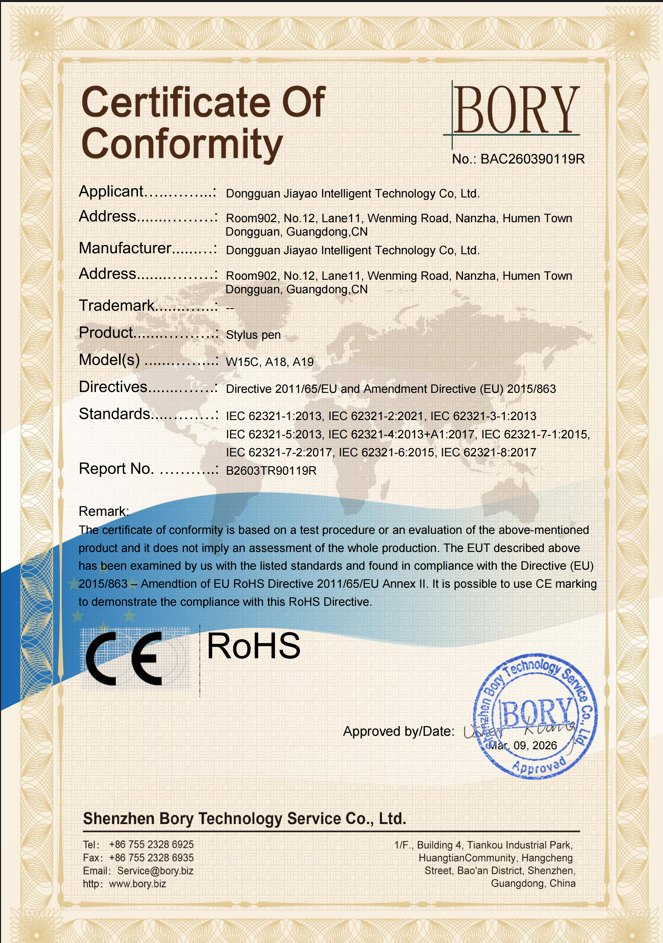
Product specifications answer what a pen does; documentation answers whether it can be sold where the buyer intends to sell it. Two documents matter most in this category. The first is a quality management system certificate: the manufacturer holds ISO 9001 certification (certificate number 24626Q00066R001, issued by HIC Certification Service against GB/T-19001-2016 / ISO9001:2015, valid from 16 January 2026 to 15 January 2029), with a registered scope of research and development of capacitive stylus. The second is material compliance for the destination market: an EU-facing RoHS certificate of conformity (number BAC260390119R, issued by Shenzhen Bory Technology Service Co.,Ltd against the IEC 62321 test series, dated 9 March 2026).
Customs classification belongs in the same checklist: stylus pens are typically classified under HS code 8471.60.90 as automatic data processing input units, which determines duty treatment and documentation at import.
Manufacturing signals then determine whether a supplier can execute at the buyer volume. Relevant published figures for this manufacturer include a minimum order quantity from 500 pieces, lead times of 20–35 days, samples in as little as three weeks and standard orders shipped in 20 days, monthly capacity of 500,000 units, and 100% inspection covering functional, tactile and visual checks on every unit. After-sales terms in this range include a one-year warranty with one-to-one replacement. OEM and ODM customization is offered across function, colour, shape, tip, logo and packaging. For buyers serving the EU, US and Middle East — markets this factory exports to, alongside a reported 40% export ratio and main markets of the EU and USA — those documents and capacity figures sit closer to qualifying criteria than to marketing claims.
The limits buyers should plan for
A framework is only trustworthy if it states where it stops working. Four boundaries apply to third-party active stylus procurement in this class.
- No pressure sensitivity. The documented difference from the Apple Pencil remains pressure input. Buyers whose workflow depends on pressure-variable stroke rendering should not expect a tilt-sensing third-party pen to substitute for that capability.
- Battery dependency. Active styluses must hold charge to function. Automatic power-off intervals and one-year standby specifications reduce, but do not remove, the risk of a flat pen mid-session — a service consideration for education and shared-device deployments.
- Magnetic attachment scope. Side adsorption on the A21B and W13-A is specified for 11-inch and 12.9-inch iPad only. Buyers planning magnetic storage on other sizes should verify before specifying.
- Body material and feel. Some wireless-charging models use a white plastic (ABS) body rather than aluminum alloy. That is a deliberate trade-off for wireless charging compatibility, not a defect, but it changes the tactile profile a buyer is specifying.
Case evidence should also be read at its true scale. The two documented ODM programs in this range — 5,000 units and 3,000 units over two years — demonstrate repeatable program execution in tablet-accessory channels, not market-wide share. Buyers with materially larger volumes should validate capacity and consistency against their own requirements.
Where the category is heading
Two trends are likely to reshape stylus procurement criteria over the next several years. The first is volume: active stylus technology is projected to grow at a CAGR of 9.8% from 2026 to 2034, which increases pressure on suppliers to standardise charging, nibs and quality documentation rather than compete on novelty. The second is interoperability. The USI 2.0 specification released in 2022, with support from Google, Intel and Lenovo, gives buyers a cross-platform reference point that did not exist a decade ago, and it shifts part of the compatibility risk from the buyer back to the supplier.
The likely practical outcome is that stylus selection becomes less about protocol and more about operations: whether a supplier can hold a compatibility list, document compliance for each destination market, supply replaceable nibs, and maintain warranty response as volume scales. Those are the criteria that will separate suppliers as the category grows, and they are measurable long before a buyer tests a pen.
FAQ
What should I buy, passive stylus or active stylus?
The deciding factor is what the pen has to do. An active stylus is powered by its battery and transmits weak electrical signals to the touchscreen, which the tablet uses to locate the tip position; that architecture enables precise writing, palm rejection and tilt sensing, and makes active pens suitable for note-taking, drawing or sketching, and for tablet gaming where the operating experience is better than with a passive pen. A passive stylus is battery-free, lower in cost and simpler to use, but it does not support palm rejection or tilt sensing, and latency and offset conditions can appear while writing. The practical rule: if the stylus only needs to replace a finger, choose a passive stylus; if the work involves note-taking, drawing or sketching, choose an active stylus.
What is the difference between a third-party stylus and the Apple Pencil?
Third-party active styluses and the Apple Pencil share precise writing, palm rejection and pause-doodle behaviour. The main difference is pressure input: the Apple Pencil provides pressure sensing, while third-party models in this class use tilt sensing and do not offer pressure sensing. Cost is the second difference, with the Apple Pencil significantly more expensive than a comparable third-party active stylus. The decision rule follows directly: buyers who need artist-grade drawing with pressure-controlled stroke weight should choose the Apple Pencil, while buyers whose requirements are note-taking and drawing can be served by a third-party active stylus. Compatibility scope is a third difference — the Apple Pencil is tied to iPad, whereas cross-platform models such as the R3-P are specified for iPad and Android tablets. Pressure sensitivity is also a price-tier feature more than a brand feature: high-end professional active pens, including Samsung S-Pen, are documented with up to 4,096 pressure levels.
Which stylus should I choose?
Once compatibility is confirmed, the choice usually comes down to charging method, working time and input features. For wireless charging, the W12-A accepts magnetic wireless charging and also provides a Type-C port, with a published cable charging time of 25 minutes, wireless charging of 60 minutes and 9–10 hours of working time. For fast charging, the A7-H-L is the model positioned for that requirement, with a published 30-minute charge and up to 16 hours of continuous working time. For the longest working time, the E3-A is specified at up to 44 hours from a 230 mAh battery with a 40-minute Type-C charge. Where the requirement is one pen across both platforms rather than maximum performance on one, the R3-P is specified for iPad and Android tablets, while the S3-GC is the Android universal option. Feature-specific requirements narrow the choice further: tilt-based drawing points to the A8-RH, shortcut-button workflows to the A30-B, and 2-in-1 use with magnetic storage to the A21B.
Tem questões ou precisa de mais detalhes?
Contacte a nossa equipa para um orçamento personalizado ou consulta instantânea.
Solicitar orçamento
Preencha o formulário abaixo e a nossa equipa entrará em contacto com uma proposta personalizada.
Chat direto do WhatsApp
Prefere conversar em tempo real? Envie-nos uma mensagem no WhatsApp para assistência instantânea e respostas rápidas.
- Obter orçamento personalizado
- Partilhar fotos ou documentos
- Discuta as suas necessidades diretamente
Geralmente responde em 5–30 minutos durante o horário de expediente.