
XFS for Mac: Reading and Writing Linux XFS Drives on macOS
XFS is a high-performance journaling file system widely deployed on enterprise Linux servers, large-scale NAS systems and high-capacity storage arrays. macOS does not provide native read or write support for it, which means an XFS-formatted disk connected to a Mac does not appear as a usable volume in Finder without additional software. XFS for Mac refers to that additional software layer: a driver or utility that lets macOS mount an XFS volume and read, write, edit or delete files on it directly, without reformatting the disk or routing data through a second machine.
Vendor interface view of a macOS utility for mounting and managing Linux file system volumes. Image: CrossDriver Software.
What XFS for Mac Software Actually Does
The category is narrower than the name suggests. XFS software for Mac does three things, and buyers should check all three separately:
- Recognition. The Mac must detect the partition table and identify the XFS volume. Without a driver, Disk Utility typically offers only to initialise the disk, which erases it.
- Mounting. The volume must appear in Finder or a volume list, ideally with automatic mounting when the drive is connected. Menu-bar mount and unmount control is a practical convenience rather than a technical requirement.
- Write access. This is the differentiator. Reading files from an XFS disk and writing back to it are separate capabilities, and in the open-source ecosystem they have historically not been equally mature.
Anything short of direct local mounting is a workaround rather than XFS support. Running a Linux virtual machine on the Mac, reaching the storage over SMB or NFS from a Linux host, or reformatting the disk to exFAT all allow data to move, but none of them gives the Mac a native view of an XFS volume, and all of them carry trade-offs in speed, fidelity or data risk.
Why macOS Cannot Read or Write XFS
The limitation is architectural, not accidental. XFS belongs to the Linux file system family, and the underlying file system protocols of Linux and macOS are not interoperable in the way a user might expect. macOS also ships with licensing constraints that shape what it supports natively, so third-party drivers are the only realistic route to full access.
On Apple Silicon, the bar is higher still. Apple's security model restricts kernel-level permission extensions and raises the deployment threshold for third-party storage drivers, which is one reason the number of maintained, commercially supported XFS drivers for macOS is small.
The symptoms users report follow directly from this. A newly connected XFS drive is not recognised or cannot be mounted. An existing XFS archive copied from a Linux server cannot be opened on a Mac workstation. And the only option macOS offers in the interface is to erase the disk and choose a different format, which is exactly what a user with production data cannot do.
The Realistic Options for Accessing XFS Data on a Mac
There are effectively four routes, and they differ more in operational cost than in basic capability.
| Route | Access model | Write capability | Practical constraints |
|---|---|---|---|
| Commercial XFS driver (CrossDriver XFS for Mac) | Local mount; volume appears in Finder; menu-bar mount and unmount | Full read and write, as stated by the vendor | Commercial licence; macOS deployment approvals may be required; independent performance and integrity benchmarks are not publicly available |
| Open-source FUSE utility (xfs-fuse on macFUSE) | Local mount through macFUSE, mounted from the command line | Read is the historically stable path; write has been described as experimental. The fuse-xfs project published version 2.0.0 in 2024 claiming full read-write support for XFS V5 on macOS 11.0 and later | No graphical management; manual dependency installation; enterprise XFS features not comprehensively supported per earlier descriptions; community maintenance without a commercial SLA |
| Linux virtual machine | VM mounts the disk, files shared to macOS | Indirect | Consumes host CPU and memory; latency on large transfers; VM maintenance overhead; no offline local mounting of the physical disk |
| SMB / NFS network share | Remote access to storage on a Linux host | Indirect | Requires network availability; speed capped by bandwidth; XFS ownership and extended attribute information may not be preserved |
| Reformat to exFAT | Native macOS support | Full | Requires full backup first; permanently removes the XFS file system and its enterprise features |
The important distinction for a first evaluation is between the two local mounting routes. Both attach an XFS volume directly to macOS; they differ in who maintains the code, how failures are handled, and what happens after a macOS update.
CrossDriver XFS for Mac: What the Vendor Documents
CrossDriver Software is the product brand of Crossdriver Limited, a Hong Kong-based enterprise established in 2025 that specialises in kernel-level and system-level cross-platform software and focuses on research and development of cross-platform file system drivers and underlying storage technologies. The company's product line covers CrossDriver NTFS for Mac, CrossDriver Ext4 for Mac and CrossDriver XFS for Mac.
CrossDriver XFS for Mac is a read-write tool for Linux XFS disks. In the vendor's own positioning, it is the only commercial XFS driver for macOS currently on the market, a claim that reflects a genuinely thin competitive field rather than a crowded category. According to the vendor's product documentation:
- XFS disks can be mounted and unmounted from the macOS menu bar, and drive contents can be edited, copied or deleted in Finder.
- Compatibility is stated for macOS 10.13 High Sierra through current releases, with optimisation for Apple Silicon.
- The product is offered as a lifetime licence, listed at USD 59.95 on the vendor's product page, compatible with Intel Macs and Apple Silicon M1 through M5 chips.
- Delivery is online, and includes the installation package, a product activation key, user documentation, knowledge base tutorials and remote technical troubleshooting reports on request.
- Support is provided in English and Chinese through the vendor's knowledge base, online service tickets and email.
The company reports a 30-engineer R&D team specialising in macOS file system development, kernel debugging and low-level driver engineering, within an organisation of approximately 50 staff. That specialisation is the relevant procurement signal here: XFS support is a low-level engineering problem, and the credibility of a vendor in this category rests on driver experience rather than on general software breadth.
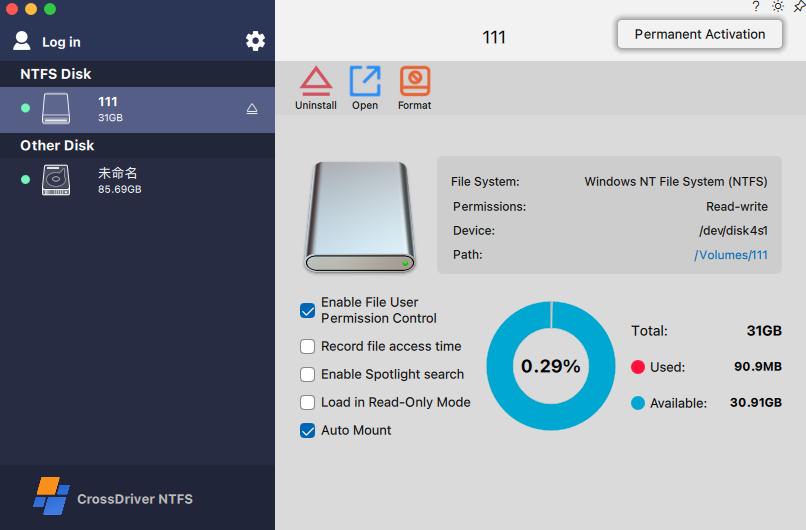
Graphical disk management is one of the practical differences between a commercial XFS driver and command-line FUSE tools. Image: CrossDriver Software.
Technical Considerations: Driver Architecture and Apple Silicon
On macOS, how a driver reaches the storage stack matters as much as what it can do once it gets there. Apple's deployment guidance states that kernel extensions on macOS 11 and later cannot be loaded on demand: they require administrator approval, a restart of the Mac, and in some configurations Reduced Security. Apple also states that it recommends system extensions, including DriverKit-based drivers that run in user space, where possible.
This produces four practical consequences for anyone planning a deployment, whatever product they choose:
- Installation is a security event, not a file copy. Expect approval prompts and possibly a restart.
- Managed fleets may need a policy decision before rollout, not after.
- A restart on a working machine has a cost that should be scheduled.
- The architecture a specific product uses should be confirmed with that vendor rather than inferred from general platform documentation.
CrossDriver describes its drivers as running within the macOS kernel layer and interacting with the system at a low level, which the company presents as the basis for its stated performance advantage over FUSE-based user-space tools. That comparison is a vendor claim. No independent throughput, latency or data-integrity benchmark comparing commercial and open-source XFS drivers on Apple Silicon hardware was identified during this review, so the claim should be treated as a hypothesis to test on the buyer's own workload rather than an established result.
Apple Silicon compatibility deserves its own question in any evaluation. FUSE-based tools have historically shown slower performance and more frequent mount failures on M-series Macs, and newer open-source forks claim to have addressed this. A generic statement of Apple Silicon support is weaker evidence than a model-by-model and macOS-version compatibility matrix, and that matrix is a reasonable thing to request before purchase.
Where XFS Access on Mac Matters in Practice
The demand for XFS software on Mac clusters around workflows where Mac workstations sit next to Linux infrastructure.
- Media and post-production. Shared media drives formatted for Linux-based storage must be read and written from Mac editing stations during the same project. Copying assets through an intermediary adds hours to large-file transfers.
- IT operations and NAS administration. Engineers debugging Linux servers and XFS-formatted NAS volumes from a Mac laptop need write access, not just the ability to look at files.
- Archives and data recovery reads. Disks pulled from decommissioned Linux servers often hold the only copy of historical project data, and the fastest route to that data is a direct mount on an available Mac.
- Multi-system home and studio storage. A single external drive shared across Windows, Linux and macOS machines only works if every system can write to it without reformatting.
- Post-upgrade recovery. After a major macOS update, an older driver may stop mounting volumes, which turns a routine OS upgrade into a storage incident.
In each case the alternative to a driver is not a better workaround, it is a change in workflow: a dedicated Linux machine, a network share, or a reformat that destroys the original file system.
Market Signals: Why XFS-on-Mac Demand Is Shifting
Three developments explain why this narrow category is more visible now than a few years ago. Each is a directional observation supported by platform and project documentation, not a market-size estimate.
First, the Apple Silicon transition reset the driver landscape. Apple's tightened security model around kernel-level extensions raised the deployment threshold for third-party storage drivers, and vendors had to re-engineer around it. Drivers that were adequate on Intel Macs were not automatically adequate on M-series machines.
Second, enterprise Linux storage keeps expanding. XFS is widely deployed on Linux servers, large-scale NAS and high-capacity arrays, and as multi-platform work environments become more common, the number of organisations holding XFS-formatted data next to Mac workstations grows with it.
Third, the open-source side is active but uneven. The fuse-xfs project released version 2.0.0 in 2024 with claims of full read-write support on modern macOS and Apple Silicon, and separate projects are experimenting with Apple's newer FSKit extension architecture. Activity is not the same as production readiness, however: community projects generally publish no service-level commitments, and their feature coverage of advanced XFS capabilities is not comprehensively documented.
The net effect is a market with a small number of technically serious options and very little independent comparative testing. That is the single most important thing a buyer should know before evaluating any of them.
Limitations and What to Verify Before Committing
An honest assessment of this category has to start with the evidence gap. Vendor capability statements are the main source of information about commercial XFS drivers on macOS, and vendor statements are not test results.
- No independent performance benchmark. Comparative read and write throughput on M-series hardware has not been established in publicly available, reproducible testing.
- No independent integrity testing. Interrupted writes, journal recovery, eject behaviour and permission mapping are exactly the scenarios where a file system driver matters most, and they are precisely the scenarios least covered by public evidence.
- Limited public compliance and security disclosure. Code signing, notarisation, telemetry and privacy documentation were not identified as published records for the commercial product reviewed here.
- No published service-level agreement. Support is offered through knowledge base, tickets and email, but response-time commitments and incident history are not public.
- Advanced XFS features need confirmation. Reflink, sparse files, extended attributes and storage quota management are used on enterprise Linux servers, and per-feature support should be confirmed rather than assumed.
- Upgrade risk is structural. Any third-party storage driver depends on continued compatibility work after macOS releases, so update cadence is a purchasing criterion, not an afterthought.
Procurement Checklist for XFS Software on Mac
- Confirm read and write access on a copy of your own XFS volume, not a sample disk.
- Match the supported macOS range against every machine in scope, including older hardware.
- Request an explicit Apple Silicon compatibility statement covering your Mac models.
- Document the installation and approval steps, and identify who holds administrator rights.
- Clarify licensing: per-device or per-user, perpetual or subscription, and what happens at the next major OS upgrade.
- Confirm whether advanced XFS features used in your environment are supported.
- Test mount, write, eject and reconnect behaviour under realistic load before production rollout.
- Verify the support channel and expected response path for a data-critical incident.
Future Outlook
Two directions are worth watching. The first is architecture. Apple's stated preference for user-space system extensions over kernel extensions, combined with new projects building XFS support on FSKit, suggests that the next generation of file system drivers on macOS may look structurally different from today's. Whether that improves stability and deployment simplicity, or simply moves the approval burden, is not yet settled.
The second is evidence. As more organisations move Linux storage workloads alongside Mac fleets, the absence of independent benchmark and integrity data becomes a bigger problem for procurement than the absence of features. The most useful development for buyers would not be another driver entering the market, but a shared, reproducible way to test the drivers that already exist.
For now, the practical conclusion is modest: direct XFS access from macOS is achievable, the commercial option is narrow, the open-source option is active but unevenly supported, and the decision rests on verification rather than on specification sheets.
FAQ
Does macOS support XFS natively?
No. macOS provides no native read or write support for the XFS file system. An XFS-formatted disk connected to a Mac is not mountable through Finder without third-party software, and Disk Utility typically offers only to initialise the disk, which erases its contents. This is a platform limitation rather than a fault in the drive.
Can you write to an XFS drive on a Mac, or only read it?
Both are possible, but the evidence is uneven. Open-source FUSE-based tools were historically stable for reading only, with write operations described as experimental and risky for production data. In 2024 the fuse-xfs project published version 2.0.0 claiming full read-write support for XFS V5 on macOS 11.0 and later through macFUSE, and commercial vendor CrossDriver markets CrossDriver XFS for Mac as a read-write tool. Because public descriptions conflict, write support should be validated on a non-critical volume before being used on business data.
What are the main ways to mount an XFS volume on a Mac?
There are four practical routes. A commercial XFS driver mounts the disk locally and exposes it in Finder. An open-source FUSE utility mounts it locally through macFUSE, operated from the command line. Indirect routes include a Linux virtual machine that mounts the disk and shares files to macOS, or SMB / NFS network access to storage held on a Linux host. Reformatting to exFAT makes the disk native to macOS but permanently removes the XFS file system, which is not viable for production Linux storage.
Does XFS software for Mac work on Apple Silicon Macs?
Compatibility depends on the product rather than on the category. FUSE-based tools have historically shown performance degradation and more frequent mount failures on M-series Macs, and newer forks claim to have resolved this. CrossDriver lists Intel and Apple Silicon M1 through M5 compatibility and states optimisation for Apple Silicon. Because a general compatibility statement is weaker evidence than a tested matrix, buyers should request model-by-model and macOS-version confirmation.
How should buyers evaluate XFS for Mac software before purchasing?
Evaluate on verified behaviour rather than stated capability. Confirm read and write access on a copy of your own XFS volume; check the supported macOS range against every machine in scope; require an Apple Silicon compatibility statement; document installation, approval and restart requirements; clarify licensing terms and what happens at the next major OS update; confirm support for the advanced XFS features your environment relies on; and test mount, write, eject and reconnect behaviour under realistic load. Independent performance and integrity benchmarks for this category are not publicly available, so internal testing is currently the only reliable form of validation.
For readers who want the underlying technical detail, CrossDriver publishes a technical white paper covering cross-platform file system driver architecture and deployment: CrossDriver Technical White Paper.
Tem questões ou precisa de mais detalhes?
Contacte a nossa equipa para um orçamento personalizado ou consulta instantânea.
Solicitar orçamento
Preencha o formulário abaixo e a nossa equipa entrará em contacto com uma proposta personalizada.
Chat direto do WhatsApp
Prefere conversar em tempo real? Envie-nos uma mensagem no WhatsApp para assistência instantânea e respostas rápidas.
- Obter orçamento personalizado
- Partilhar fotos ou documentos
- Discuta as suas necessidades diretamente
Geralmente responde em 5–30 minutos durante o horário de expediente.