
tranScreen Wireless Presentation: A Buyer-Side Analysis
Wireless presentation has moved from a convenience accessory to a specified line item in meeting-room, classroom and exhibition-hall budgets. This analysis examines tranScreen Wireless Presentation — the product portfolio of Shenzhen tranScreen Technology Co., Ltd. — against the criteria professional buyers actually apply: manufacturing base, engineering depth, product architecture, integration flexibility and the limits a specification should account for.
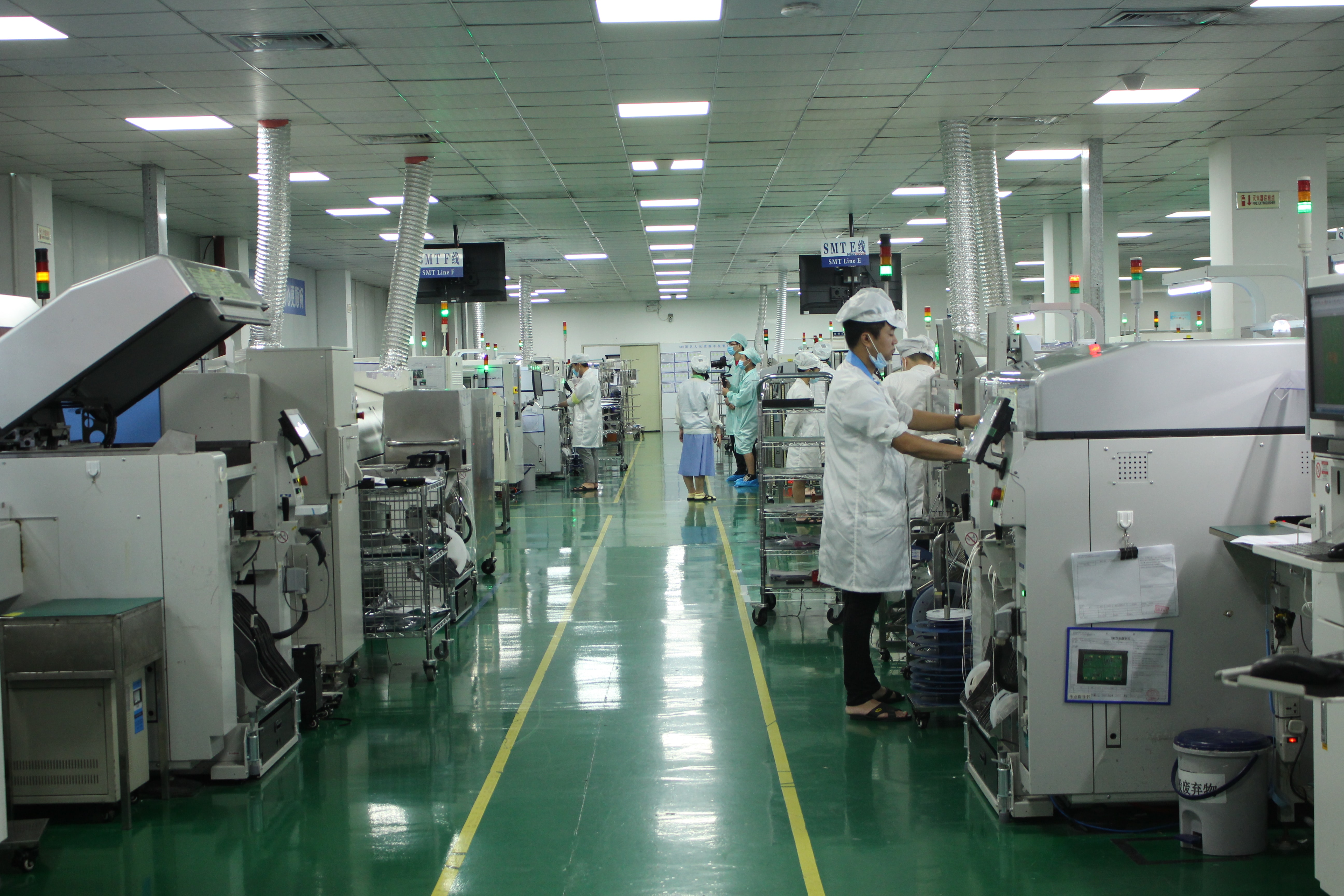
Inside the 4,000 m² tranScreen manufacturing facility in Shenzhen, where wireless presentation hardware is assembled and tested. Image: tranScreen.
Why wireless presentation became a procurement category
The core problem is familiar in every modern building: the display is fixed, the room is booked, and the people in it arrive with laptops and tablets that share nothing in common. HDMI cabling solves a single case — one device, one cable, one input — and fails as soon as a hybrid participant joins, a presenter switches, or a classroom has nine students with nine screens.
Wireless presentation systems replace that cable with a receiver attached to the display and a mix of software, dongles and protocol support on the sending side. The practical outcome is fewer inputs to manage, faster meeting start times, and the ability to bring a personal video-conferencing session into the room — the workflow now commonly described as BYOM (bring your own meeting).
The category is large enough to attract serious procurement attention. Commercial research published in 2026 values the global wireless presentation solutions market at USD 7.8 billion in 2025, with a forecast of USD 14.2 billion by 2034 at a 8.3% CAGR (DataIntelo, 2026). Hardware remains the dominant component, accounting for 52.1% of revenue share in the same estimate. For buyers, that split matters: the decision is still mostly a hardware qualification exercise — enclosure, radio, latency, ports and firmware — rather than a software licensing negotiation.
Who tranScreen is
Shenzhen tranScreen Technology Co., Ltd. is a Chinese manufacturer of commercial wireless screen-sharing and audiovisual hardware, founded in 2014 and headquartered in Shenzhen, Guangdong. The company designs, develops and manufactures wireless presentation systems, wireless video matrix switchers, wireless transmitters, video collaboration servers, presentation peripherals and related accessories, and supplies both standardized catalogue products and customized hardware and software for partners.
Its stated product scope covers wireless presentation systems, screen-sharing transmitters and receivers, multi-screen interaction solutions and audiovisual accessories, positioned for meeting rooms, classrooms, training centres, conference halls and other professional spaces. Around 30% of output is exported, with listed major markets in Southeast Asia, South Asia and South America. That is a relevant disclosure for buyers: tranScreen is not presenting itself as a single-region domestic supplier, but its documented export footprint is narrower than that of the largest established AV brands.
The manufacturing and engineering base behind the catalogue
A wireless presentation product is easy to demonstrate and hard to manufacture consistently. Radio performance, thermal behaviour, firmware stability and port tolerances all sit inside a small aluminum enclosure, and those are production issues rather than design-slide issues. The disclosed operating data is therefore the most useful starting point for supplier assessment.
| Operating fact | Disclosed value | What it means for a buyer |
|---|---|---|
| Foundation | 2014, Shenzhen | More than a decade of operation in the Shenzhen electronics supply chain |
| Facility size | 4,000 m² | A single-site operation, suitable for mid-volume commercial orders |
| Headcount | Approximately 50 staff | Lean organisation; expect direct access to engineering, and limited parallel account management |
| R&D team | 30 engineers | Engineering is the largest disclosed function — consistent with a customization-led model |
| Annual capacity | 120,000 units | Capacity to support project rollouts and OEM programmes, not mass-consumer volumes |
| Export share | Approximately 30% | Export experience exists, but domestic and regional business still dominates |
The ratio that stands out is engineering versus total headcount: 30 engineers in an organisation of roughly 50 people. For procurement, that configuration usually means customization requests reach engineers quickly, and it also means the commercial team is thin. Buyers planning multi-country rollouts should confirm project management capacity and response times rather than assuming a large account structure.
The company states that all products and solutions are independently researched, developed and manufactured, which is the basis for its claim to control quality, compatibility and customization. That statement should be verified during supplier audit rather than accepted as a differentiator on its own — but the capacity, headcount and R&D figures are at least internally consistent with a design-and-manufacture operation rather than a trading intermediary.
Product architecture: four layers a buyer should distinguish
tranScreen’s portfolio is best read as four functional layers rather than a flat product list, because each layer answers a different room problem and a different procurement question.
Layer 1 — Room-level receivers
These are the boxes that connect to the display and terminate the wireless session. Two models define the range for most rooms:
| Model | Positioning | Key disclosed specifications |
|---|---|---|
| PTB4615 Wireless Presentation Receiver | Small and medium meeting rooms, training rooms, collaboration spaces | Android 10; H313 CPU; 1 GB DDR3; 8 GB eMMC; dual-band 2.4/5 GHz Wi-Fi at 867 Mbps hotspot; up to 8 connected devices; 100 Mbps Ethernet; 2 split screens; <90 ms average latency at 3 m / 1080P; >30 m visible transmission at 1080P |
| PTB3219 4K Wireless Presentation | Corporate meeting rooms, training rooms, classrooms | Android 11; Wi-Fi 6 dual-band; up to 1,201 Mbps hotspot; up to 9 hotspot devices; 1× HDMI in up to 4K@30Hz; 2× HDMI out (main 4K@60Hz, secondary 2K@60Hz); Gigabit Ethernet; 1/2/4/9 split-screen; <150 ms average latency at 10 m / 1080P |
The distinction is not simply 2K versus 4K. The PTB4615 is a low-latency short-range unit with a stated sub-90 ms figure at 3 m, which suits a huddle room where the presenter stands close to the display. The PTB3219 trades absolute minimum latency for Wi-Fi 6 throughput, dual HDMI outputs and 4K output — the profile of a boardroom where two displays and higher resolution matter more than the last few milliseconds.
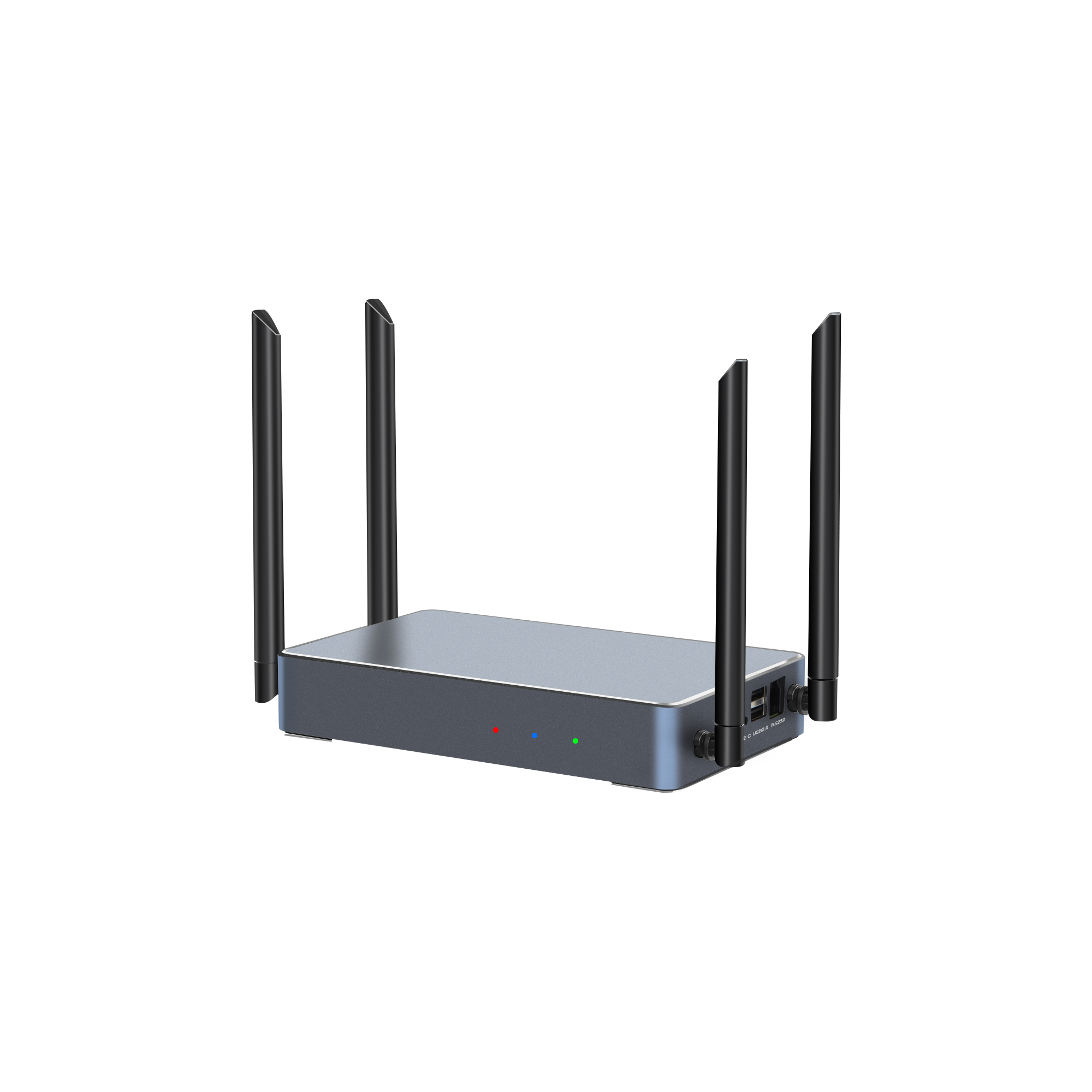
The PTB3219 4K wireless presentation unit: Wi-Fi 6, dual HDMI outputs and 1/2/4/9 split-screen for boardroom and classroom deployments. Image: tranScreen.
Layer 2 — Multi-screen interaction and matrix switching
Where a single receiver is not enough, the portfolio moves into systems that combine several simultaneous streams with layout control. The PTB3609 Multi-screen Interactive Presentation supports one true 4K stream, four 1080P streams or nine 720P streams, with 1/2/4/9 layouts, 10-point touchback for Windows and macOS, a built-in whiteboard and annotation layer, wireless notes for fewer than 128 users, PIN-code access control and Bluetooth 5.0, running on Android 11 with Wi-Fi 6 and Gigabit Ethernet. The PTB3509 Paperless Presentation sits in the same family and adds centralized content management and RTSP streaming for AV integration, with a stated capacity of up to 64 participants.
The PTM6302 Wireless Video Matrix is a different instrument entirely: a 1U chassis with four HDMI inputs, nine HD outputs, up to eight wireless connection devices, simultaneous wireless casting from four devices, up to four windows per display and up to 36 freely positioned windows at 1080P@30Hz. At roughly 3 kg and approximately 20 W, it is a rack-mounted routing device rather than a room accessory, and is aimed at command centres, exhibition halls and multi-source display environments.
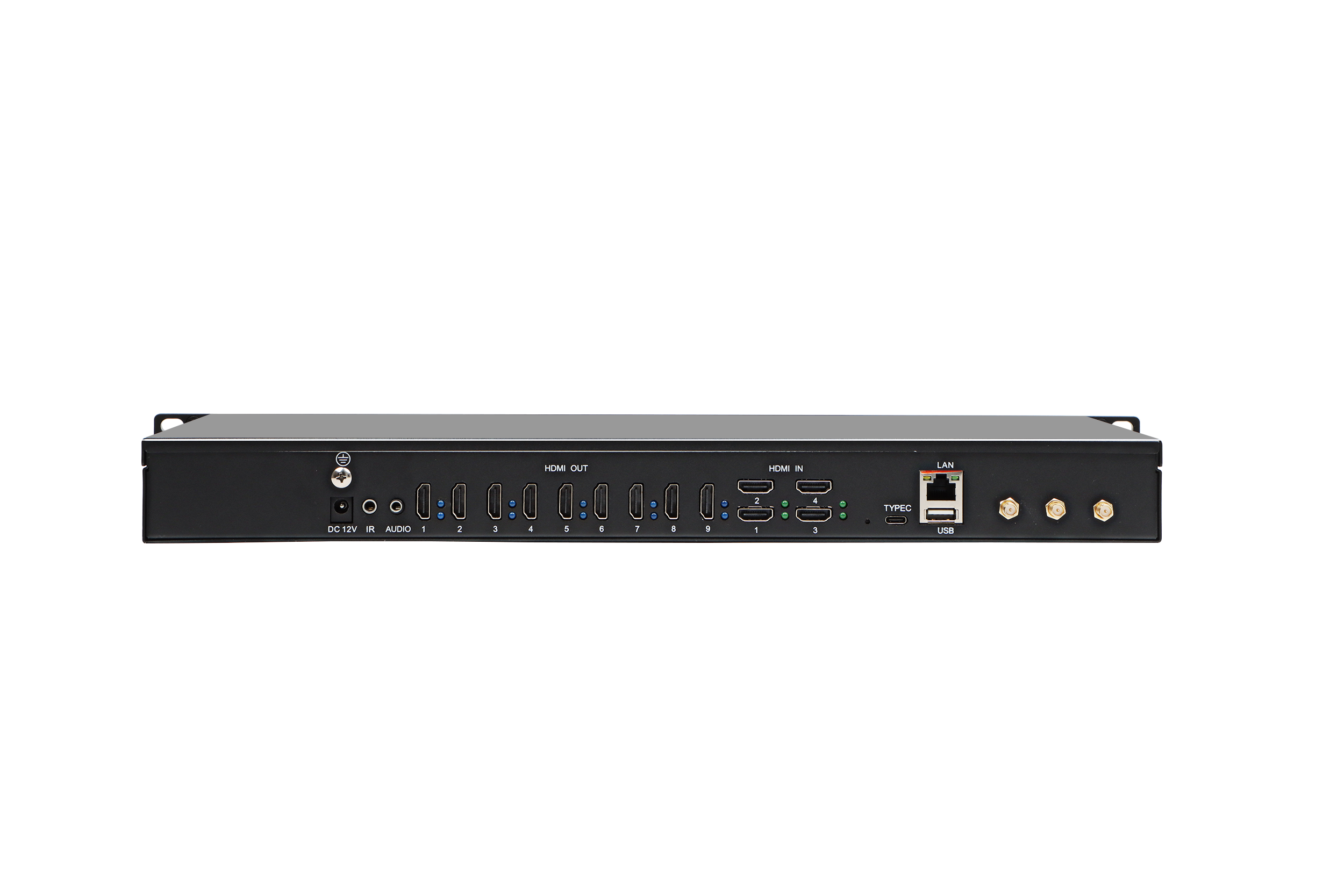
Interface side of the PTM6302 wireless video matrix: four HDMI inputs, nine HD outputs and wireless input integration in a 1U chassis. Image: tranScreen.
Layer 3 — Transmitters and BYOM endpoints
The transmitter line is where tranScreen’s engineering choices are most visible, because the company maintains parallel USB-C and HDMI designs at both 2K and 4K:
| Model | Interface | Maximum transmission | Notable disclosed detail |
|---|---|---|---|
| PTB1304 Type C 2K Transmitter | USB-C | 1920×1080; 60 fps input, <30 fps transmission | 900 MHz Linux CPU; dual-band Wi-Fi at 867 Mbps; startup <15 s; mouse touchback |
| PTB1305 HDMI 2K Transmitter | HDMI | 1920×1080; up to 30 fps transmission | For sources without USB-C video output; USB 2.0 power; SDK integration with room control |
| PTB1312 Type C 4K BYOM Transmitter | USB-C | 3840×2160; transmission ≤30 fps | Linux 4.19; 8 GB eMMC; UAC support; configurable button for freeze casting or BYOM source switching; 87±2 g |
| PTB1308 HDMI 4K BYOM Transmitter | HDMI | 3840×2160 | Startup ≤15 s; pairing and receiver Wi-Fi configuration transfer |
Two details are worth flagging in a specification review. First, all four transmitters state a transmission frame rate at or below 30 fps even where input is 60 fps — normal for this class of product, but relevant for anyone expecting high-frame-rate motion content. Second, the PTB1312’s configurable button for freeze casting or BYOM source switching indicates firmware-level attention to hybrid-meeting workflows rather than pure mirroring.
Layer 4 — Presentation control and peripherals
tranScreen also manufactures the physical layer of a presentation: the PPT2105 Wireless Presentation Pen (2.4 GHz, 30 m+ range, 650 nm ±10 nm digital laser, 200 mAh, >50 hours, 50±3 g), the PPT2201 Whiteboard Pen (BK2535, 2.4 GHz, 30 m+, long-press to launch the built-in whiteboard app, double-click to annotate), the PMS2402 Wireless Presentation Mouse (800–2400 DPI, 250 Hz polling, eight buttons, 300 mAh, 120-hour battery, ≤8 ms response) and the PTB-EXB Transmitter Display Stand, an aluminum two-slot holder with anti-slip pads and a built-in counterweight.
Individually these are minor items. Collectively they matter for two reasons: they let a single supplier cover the room rather than just the display, and they reduce the “missing dongle” failure mode that undermines wireless systems in daily use. The PTB8800 Video Collaboration Server extends the same logic upward — an Android 15 / RK3588 platform with 8 GB DDR5, up to 16 simultaneous wireless mirroring streams, up to 32 simultaneous 1080P video streams, 8K@60Hz output on HDMI OUT1, dual-port video-wall stitching, and master-slave redundancy with millisecond-level failover.
Technical explanation: what the specification numbers actually describe
Latency. tranScreen publishes average transmission latency in defined conditions rather than a single marketing figure: below 90 ms at 3 m and 1080P on the PTB4615, and below 150 ms at 10 m and 1080P on the PTB3219 and PTB3609. Publishing distance and resolution alongside the number is the right practice, because latency rises with range and with content complexity. Buyers should treat these as manufacturer-stated test conditions and confirm them in their own room, not as a universal guarantee.
Range. The stated figure is more than 30 m visible transmission at 1080P, line of sight. Line of sight is the operative phrase — drywall, glass partitions and dense 5 GHz congestion all reduce real performance, which is why room surveys still matter.
Split-screen and concurrency. Multi-screen models support 1/2/4/9 layouts, with the PTB3609 handling one true 4K stream, four 1080P streams or nine 720P streams. The trade-off is explicit: more simultaneous windows means lower per-stream resolution. Company documentation also describes nine simultaneous casting streams with connection capacity of up to 16 devices on its casting box — connection capacity and concurrent active streams are different numbers and should be specified separately in a tender.
Protocols and operating systems. Disclosed support covers AirPlay, Miracast, DLNA, Google Cast and tranScreen’s own protocol, with software casting for Windows, Android, iOS, macOS and Chrome, and hardware casting for Windows and macOS. For mixed-device environments this breadth is the single most practical selection criterion.
Control and governance. PIN-code casting (6-digit code, 6-digit universal code, 8-digit universal code per company documentation), transferable host privilege, configurable main presenter and local or server-based access control address the governance question that IT departments raise in every wireless presentation review.
Application fit: where these systems are designed to sit
Documented deployment scenarios cluster into five groups, and the mapping to specific models is unusually clear:
| Environment | Typical requirement | Matching tranScreen configuration |
|---|---|---|
| Small and medium meeting rooms | Fast start, low latency, mixed laptops and phones | PTB4615 receiver with AirPlay / Miracast / DLNA support |
| Boardrooms and hybrid meeting rooms | 4K output, dual displays, BYOM | PTB3219 with PTB1312 or PTB1308 BYOM transmitters |
| Smart classrooms and training rooms | Multi-student sharing, annotation, cross-platform | PTB3609 or PTB3509 with wireless pens and mouse |
| Exhibition halls and showrooms | 4K demonstration, multi-display, fast switching | PTM6302 matrix or PTB8800 server for large-format walls |
| Control rooms and command centres | Many sources, windowing, redundancy | PTB8800 with master-slave failover and RS232/RS485 control |
A separate and commercially significant scenario is OEM and SDK integration: adding wireless presentation and casting capability to an interactive flat panel, professional display or Android mainboard. This is where tranScreen’s stated customization model is most relevant, and where compatibility with the host Android version and chipset becomes the decisive technical question.
Market trend: hardware density, not hardware replacement
Three verifiable signals frame the category’s direction. First, hardware still carries 52.1% of revenue in the wireless presentation market, which suggests buyers continue to purchase physical endpoints rather than migrating fully to software-only casting. Second, regional demand is uneven: Grand View Research reported North America holding 33% revenue share of the wireless display market in 2023, which is consistent with the concentration of enterprise meeting-room estates in that region. Third, compliance has become a procurement gate rather than an afterthought — the FCC’s base forfeiture for marketing unauthorised radio-frequency equipment is USD 7,000 per model under 47 CFR Part 2, a figure small enough to be ignored by a reseller and large enough to matter across a product line.
Public product positioning from established vendors points in the same direction: BenQ positions its InstaShow VS25 around BYOM for hybrid meetings with 4K/60Hz playback, touch control and USB-C/USB-A peripheral hub connectivity; ATEN positions the PresentON VP201 as a USB-C dongle working with its VP2020/VP2021 switches; PeopleLink states its BYOM presenter system can send 4K pixel-to-pixel video to two displays with up to 128 connections and nine split screens. The shared pattern is that wireless presentation is being redefined as a room-integration product with peripheral and conferencing support, not as a screen-mirroring gadget. tranScreen’s transmitter-and-server range follows that shift, though its published evidence base is thinner than that of the largest brands.
Wireless versus fixed HDMI: an honest comparison
Wireless presentation is not a universal replacement for cabled infrastructure. The comparison below reflects the trade-off as it applies to a commercial room, including where cabling remains the better answer.
| Criterion | Fixed HDMI / cabled switching | Wireless presentation (tranScreen class) |
|---|---|---|
| Determinism | Fully deterministic; no radio variables | Depends on RF conditions, channel congestion and distance |
| Resolution ceiling | Limited mainly by cable and switcher | 4K output on PTB3219/PTB3609/PTB8800; transmitters transmit at ≤30 fps |
| Multi-user sharing | Requires additional hardware ports and switchers | Native; up to 9 split screens and multiple concurrent streams on multi-screen models |
| Installation cost | High in retrofit projects; conduit, plates, extenders | Lower cabling burden; receiver plus power and network |
| Failure mode | Physical: cable, port, connector | Logical: pairing, firmware, network policy — recoverable but requires process |
| Best fit | Fixed workstations, broadcast-critical feeds, permanent control desks | Multi-user meeting rooms, classrooms, showrooms, hybrid collaboration |
The practical conclusion for most buyers is a hybrid specification: retain one cabled input as a fallback and treat wireless as the primary path. That is also how tranScreen’s own products are built — the PTB3219, PTB3609 and PTB8800 all include wired HDMI inputs alongside wireless capability.
Limitations and boundaries buyers should record
A credible supplier assessment includes what the available evidence does not establish.
No independent performance verification. The latency and range figures cited here are manufacturer-stated. No third-party benchmark of tranScreen hardware was available for this analysis, and claims such as “zero latency” used elsewhere in the category are not quantified and cannot be compared directly.
Limited public commercial data. Pricing, MOQ, tooling cost, sample lead time and production lead time are not disclosed in the available material. Buyers must obtain these through RFQ rather than infer them.
Certification scope is stated broadly. tranScreen states it holds 3C, CE and SRRC certifications for related markets. Jurisdiction-specific radio, EMC, safety and cybersecurity documentation — including EU RED and North American authorisation — should be requested per model per destination before purchase orders are released.
Brand recognition is narrower. With an export share of approximately 30% and listed markets concentrated in Southeast Asia, South Asia and South America, tranScreen is not positioned as a global tier-one brand. Buyers seeking end-user brand pull should factor this in; buyers seeking OEM supply and customization should treat it as neutral or favourable.
Resolution and frame-rate ceilings exist. The PTB3219 HDMI input accepts up to 4K@30Hz, and PTM6302 wireless casting is stated at 1080P@30Hz. These are adequate for presentation content and insufficient for high-frame-rate motion use cases.
Procurement value: how to evaluate tranScreen
For a buyer at the research stage, the defensible value proposition is not a performance claim but a structural one: tranScreen combines design, manufacturing and customization in one 4,000 m² facility with a 30-engineer R&D team and 120,000-unit annual capacity, covering receivers, transmitters, matrix systems, a video server and presentation peripherals as a single catalogue.
That translates into four procurement advantages and one requirement:
Single-source room coverage. A meeting-room refresh can be sourced from receivers, dongles, pens and stands in one order, simplifying spares and compatibility management.
Customization headroom. OEM and ODM availability is stated for transmitter lines, with SDK integration for room control systems on the PTB1305 and configurable firmware behaviour on the PTB1312.
A clear capability ladder. Buyers can scale from an 8-device huddle-room receiver to a 9-stream classroom system to a 16-stream 8K-capable server without changing vendor.
Service commitment. The main unit of the product carries a three-year free warranty, with accessories replaced free within three months and technical support continuing after warranty expiry, according to company documentation.
The requirement: validate. Ask for a sample unit tested in the actual room, request certification files for each destination market, and confirm lead times and MOQ in writing. The company’s own troubleshooting guidance — that a dongle may need host-side authorisation and re-pairing — is a reminder that deployment process, not just hardware, determines whether a wireless room works.
Future outlook
The direction of the category is reasonably clear from the disclosed product roadmaps of multiple vendors: wireless presentation is converging with room peripherals, cameras and conferencing. tranScreen’s PTB8800 — UVC/UAC support, RS232, dual RS485, GPIO and infrared control, plus master-slave redundancy — is already written for that converged role rather than for screen mirroring alone.
Two developments would materially change how the company is assessed. The first is independent latency, throughput and concurrent-stream testing: manufacturer figures are useful for shortlisting, but published third-party benchmarks are what turn a shortlist into a standard. The second is clearer jurisdiction-by-jurisdiction compliance documentation, given that the cost of getting radio authorisation wrong is quantified and non-trivial. Until then, tranScreen is best characterised as a capable, customization-oriented manufacturing partner with a broad hardware range and an evidence base that is honest but still largely self-reported.
Frequently asked questions
What is tranScreen Wireless Presentation, and what does the company manufacture?
tranScreen Wireless Presentation refers to the wireless screen-sharing product portfolio of Shenzhen tranScreen Technology Co., Ltd., a manufacturer founded in 2014 and based in Shenzhen, China. The range covers wireless presentation receivers, USB-C and HDMI transmitters at 2K and 4K, multi-screen interactive presentation systems, a wireless video matrix, a video collaboration server, and presentation peripherals such as wireless pens and a presentation mouse.
What latency and connection capacity do tranScreen systems state?
Stated average latency is below 90 ms at 3 m and 1080P on the PTB4615 receiver, and below 150 ms at 10 m and 1080P on the PTB3219 and PTB3609. Stated visible transmission distance is more than 30 m at 1080P line of sight. Connection capacity varies by model: up to 8 connected devices on the PTB4615, up to 9 hotspot devices on the PTB3219, and up to 16 devices on the multi-screen casting box according to company documentation. These are manufacturer figures and should be confirmed in the target room.
Which tranScreen model fits a meeting room, a classroom, and an exhibition hall?
For small and medium meeting rooms, the PTB4615 receiver suits short-range, low-latency sharing. For boardrooms and hybrid rooms needing 4K, dual HDMI outputs and BYOM, the PTB3219 with PTB1312 or PTB1308 transmitters is the documented configuration. For classrooms and training rooms, the PTB3609 or PTB3509 multi-screen systems support 1/2/4/9 layouts, annotation and multi-user sharing. For exhibition halls, the PTM6302 wireless video matrix provides four HDMI inputs and nine HD outputs, while the PTB8800 server is specified for large-format LED walls and command centres.
Can tranScreen hardware and software be customized or integrated into an existing AV or IFPD platform?
Yes, within the scope the company states. tranScreen offers standardized products plus customized hardware and software for partners, lists OEM and ODM availability on transmitter lines, and provides SDK integration with room control systems on the PTB1305 HDMI 2K transmitter. For display integration, the documented requirement is compatibility with the host’s Android version and chipset, and stable hardware or software integration with the display platform.
What certifications, warranty and support accompany tranScreen products?
The company states that it holds 3C, CE and SRRC certifications for related markets, and that it will provide documentation to support certification for other markets. The main unit carries a three-year free warranty, with free replacement rather than repair for proven quality issues; accessories are replaced free within three months. After warranty expiry, technical support and after-sales service continue.
How does tranScreen compare with established wireless presentation brands?
Established vendors publish different emphases. BenQ positions its InstaShow VS25 around BYOM with 4K/60Hz playback, touch control and USB-C/USB-A peripheral connectivity; ATEN positions the PresentON VP201 as a USB-C dongle used with its VP2020 or VP2021 4K switches; PeopleLink states up to 128 connections, up to nine split screens and 4K output to two displays. tranScreen’s documented differentiators are its combination of receivers, transmitters, matrix, server and peripherals from one manufacturer, stated OEM/ODM and SDK customization, and a 4,000 m² facility with 120,000-unit annual capacity. Its comparative gap is the absence of published independent performance testing and a narrower international brand footprint.
The full product and specification catalogue is available as a downloadable PDF catalogue. Company information is published at www.transcreen.com.
Tem questões ou precisa de mais detalhes?
Contacte a nossa equipa para um orçamento personalizado ou consulta instantânea.
Solicitar orçamento
Preencha o formulário abaixo e a nossa equipa entrará em contacto com uma proposta personalizada.
Chat direto do WhatsApp
Prefere conversar em tempo real? Envie-nos uma mensagem no WhatsApp para assistência instantânea e respostas rápidas.
- Obter orçamento personalizado
- Partilhar fotos ou documentos
- Discuta as suas necessidades diretamente
Geralmente responde em 5–30 minutos durante o horário de expediente.